Valgrind is a CPU simulator which is used by KDE and many other projects to profile and debug our programmes. In the interview below Valgrind author Julian Seward talks to KDE Dot News about why he developed Valgrind, how you can use it and, most importantly, where the name comes from. Julian will be giving a talk on Valgrind next Sunday at FOSDEM.
Julian Seward, Valgrind lead
Please introduce yourself and your Free Software work
I'm the founder and project lead for Valgrind. My background is in
compiler technology, having been fascinated by them for a good couple
of decades. I've also been interested in issues of software
correctness for a long time. Eventually I combined these interests
into creating Valgrind, a simulation-based tool which you can use to
debug and profile your programs.
Since the original 1.0 release, Valgrind has received a great deal of
development effort from many talented people. As a result it is now
far more capable, robust and portable than I ever expected.
I'm also the author of bzip2, a data compression program.
As a compiler writer I worked for three years on the Glasgow Haskell
Compiler, an open source implementation of the functional language
Haskell, working mostly on the back-end code
generation, register allocation, and bytecode interpretation. Haskell
is a really remarkable programming language. Although I don't
currently use Haskell much, the functional-programming style of thinking
about problems is something I continue to find valuable, particularly
in designing some aspects of Valgrind.
What can a typical programmer do with Valgrind?
Save a lot of time and hassle when debugging and profiling their code,
and thereby deliver more stable and faster code to end-users.
Think of running your program on Valgrind as if you were running it on
a special, magical computer, which can collect all manner of useful
information that no real machine can get for you.
Valgrind now provides a suite of different tools built around a common
core. The most important tools are Memcheck, Cachegrind, Massif and
Callgrind.
Memcheck is a tool for finding memory management bugs in C, C++ and
Fortran programs. Using Memcheck you can detect the following errors,
which are hard to track down or even detect by other means:
- reading and writing freed memory
- reading and writing off the start/end of malloc'd blocks
- use of uninitialised values
- passing garbage values to system calls
- leaked memory
The Cachegrind profiler provides detailed low-level profiling. It
counts instructions, memory references and most importantly cache
misses, on a per-instruction, per-source-line, per-function and
per-program basis. As a result of doing that, you can find places
where your code is losing time by doing too many cache misses or
instructions. Most other profilers cannot find that information for
you. In the past few months we have been able to use cachegrind on
Valgrind itself, resulting in some cases in a 25-30% speedup by
removing cache misses found in places we never imagined they would be.
Massif is a space profiler. It monitors your program's malloc/free
(and new, delete, etc) calls to collect information on who allocated
what, where, when. It will then draw pretty pictures such as
in the manual
and provide extensive information to help answer questions about
storage use in your code. You can use that information to reduce
space use, particularly for allocation intensive C++ code.
Callgrind is a
sophisticated profiler by Josef Weidendorfer. It can do gprof-style
attribution of costs between callers and callees. It can measure all
manner of costs, including function entry/exit counts, as well as the
lower level instruction / memory access / cache miss counts that
Cachegrind provides. Callgrind will even measure estimated CPU
cycles, if you ask nicely. Callgrind has an associated KDE GUI,
KCacheGrind, which helps navigate the vast mountains of performance
data that Callgrind quickly accumulates.
There are other tools which have come and gone. In particular we
have Helgrind, a tool for detecting data races in threaded programs
(places where there should be a lock protecting global data, but
there is none). For technical reasons Helgrind stopped working about
a year ago, but recent work on Valgrind's infrastructure means it
should be possible to bring it back to life, which is something that
we would like to see, and is requested by many users. Unfortunately
no Valgrind developers currently have the time/energy to do so.
We would be interested in hearing from folks interested in pushing
Helgrind along. You'll need a solid grasp of threading and
assembly-level programming, and some understanding of compiler
internals.
How does Valgrind work?
It's essentially a simulator for user-space code, designed for
flexible instrumentation and data collection. The program is run on a
synthetic CPU implemented in software. Your program's instruction
stream is unpicked into a simple representation. Instrumentation
(debugging or profiling code) is added, and the result is converted
back into machine code. All this is done on demand, on the fly,
whilst your program is running. (That's why Valgrind is so slow
starting programs -- it's busy instrumenting them).
There's also a lot of nasty details behind-the-scenes, all aimed at
giving your program the illusion it is running "normally". Most of
this nastiness is to do with system calls, signals and threads. It
works well enough that you can run most programs unmodified on
Valgrind with no special preparation.
Nowadays Valgrind runs on {x86,amd64,ppc32,ppc64}-linux, which means
you probably have very little excuse not to use it!
How can a coder start using Valgrind?
You can run any program directly on valgrind, just do "valgrind
--tool=<toolname> my_prog --args --for --my --prog". No preparation
needed.
For best results, you should recompile with debugging info (-g). If
using Memcheck, restrict compiler optimisation if you can (-O1, or
ideally -O0 if you have the patience). If profiling, you should
optimise as usual, but also use -g.
There are many resources, including on-line documentation on our website.
There are also mailing lists for both
users and developers.
Valgrind is a really powerful tool suite. Although you can start off
easily, like any sophisticated tool, it takes a while to understand
what the debugging/profiling tools are telling you, and how to best
use them. Expect to spend a couple of evenings playing with Valgrind
before you are a Power User :-)
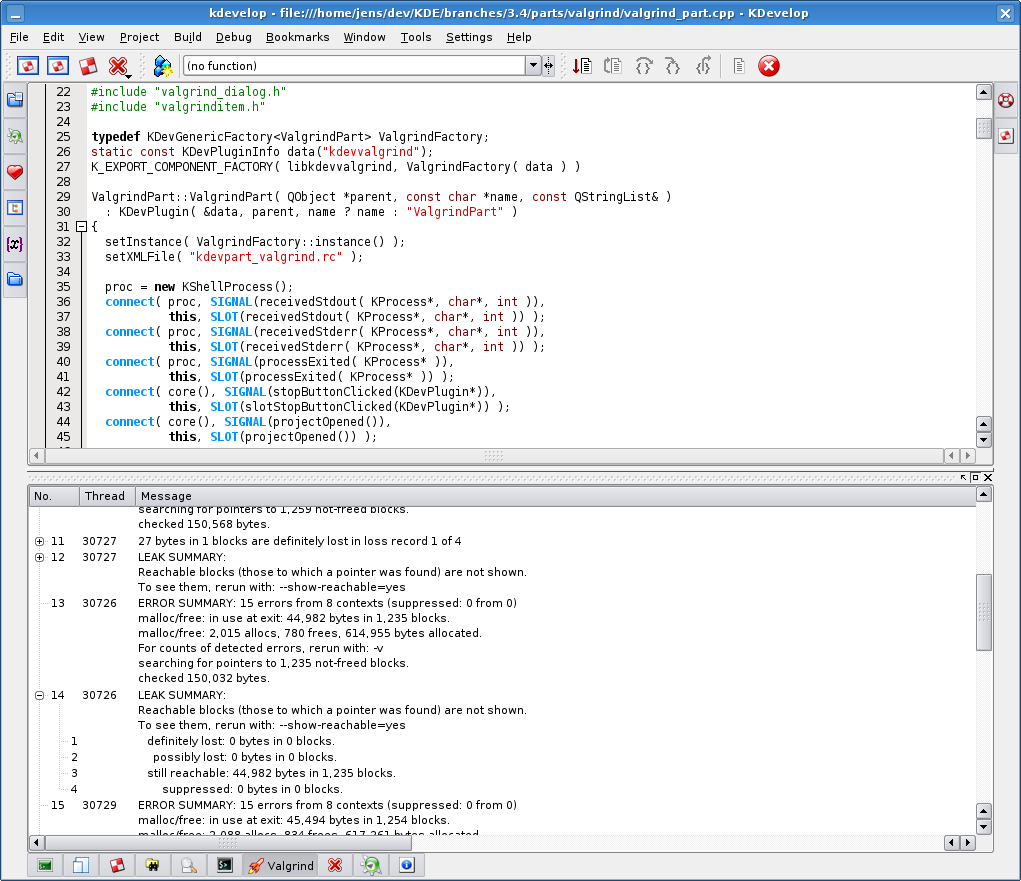
How well does Valgrind integrate with KDevelop?
I don't know because I've never used KDevelop. I believe KDevelop has
Valgrind support, but I don't know any more than that.
Are many projects using Valgrind?
From the feedback we get, it appears that many big-name open source
projects use it. We have a page listing literally hundreds
of users, and that's just the ones that are happy to be publically
listed. A short except:
All the projects on this page use or have used Valgrind,
e.g. Firefox, OpenOffice, StarOffice, AbiWord, Opera, KDE, GNOME,
Qt, libstdc++, MySQL, PostgreSQL, Perl, Python, PHP, Samba,
RenderMan, Nasa Mars Lander software, SAS, The GIMP, Ogg Vorbis,
Unreal Tournament, Medal of Honour, RenderMan ...
Do you have examples of cases where Valgrind has made a big
difference to a program?
We get a lot of informal feedback indicating that Valgrind is useful.
We have done two surveys of the user base, generating more than 300
responses. These also indicate Valgrind is useful and have provided
us with much insight into the needs and concerns of our users. See
the surveys page for details, including
summarised conclusions from the survey.
Another indication we have is a study by Jens-Heiner Rechtien. He ran
some tests on OpenOffice.org (pre 2.0) and wrote a short account of
the bugs Memcheck found, at. It makes
interesting reading. Memcheck found 102 problems in 26 source files.
Rechtien comments:
A rough evaluation of the consequences of the detected problems
showed that about one third would never show up as a program
failure for the user, another third are bugs which have no
consequences yet, but might lead to regression later if code is
changed and the last third are plain bugs which might crash the
application or lead to malfunction anytime.
What is the relationship of Valgrind to KDE?
The KDE folks were Valgrind's first big users ("early adopters"), and
a lot of valuable early feedback and development effort came from
KDE-land. KDE 3.0 was the first KDE release to be debugged using
Valgrind.
There's no specific connection nowadays. For a long time kde.org gave
us a web-home (www, cvs), which was great. About a year ago we
migrated to our own valgrind.org domain, but we still use the bugzilla
at kde.org.
I believe many KDE developers use Valgrind, but we have no direct way
to find out for sure.
I've used KDE practically every day since 1.0beta4, which I remember
compiling up years ago on a sparc-solaris box. I'm a KDE fan :-)
How did you choose the name Valgrind?
Shaggy dog story (and FAQ!).
The name comes from Nordic mythology. Originally (before release) the
project was named Heimdall, after the watchman of the Nordic gods. He
could "see a hundred miles by day or night, hear the grass growing,
see the wool growing on a sheep's back" (etc). This would have been a
great name, but it was already taken by a security package, "Heimdal".
So instead we named a recently-acquired cat Heimdall, and kept
searching. For a while the project had no name at all.
Eventually we settled on Valgrind, which is another Nordic name.
"Valgrind is the name of the main entrance to Valhalla (the Hall of
the Chosen Slain in Asgard). Over this entrance there resides a wolf
and over it there is the head of a boar and on it perches a huge
eagle, whose eyes can see to the far regions of the nine worlds. Only
those judged worthy by the guardians are allowed to pass through
Valgrind. All others are refused entrance."
It's not short for "value grinder", although that's not a bad guess.
Useless fact: most people pronounce it "val-grind". I pronounce it
"val-grinned", for no particular reason. Maybe someone familiar with
Nordic languages and mythology can tell us how the word should be spoken?
Comments
Valgrind is the perfect complement to a debugget to help improving our programs :-)
Thanks a lot!
I've been studying Norwegian for a few years (being half Norwegian myself), and I think an English speaker could roughly approximate the Norwegian pronunciation of Valgrind as "Vull-grinned".
Of course I could be wrong, so if there are any natives out there who'd like to correct me, please feel free :)
Close, Vul-grinned, with a long "u" sound. (Not "vjool")
To pronounce as we would in Denmark it is first "val" then "grind".
In icelandic it´s Val (like in Value) grinned.
It was written in Icelandic so it should be the closest.
The Val part is to choose or the choosen.
And Grind is a fence.
Grind is fence in icelandic? That makes no sense, in swedish 'grind' means a gate, typically one found in a fence. Hence, Valgrind is the gate to Valhall, where Valhall means 'Hall of the chosen'.
Axel is correct when he states that grind means gate, in a fence. He is incorrect when he states "Valgrind is the gate to Valhall", as Val has two meanings in Norwegian, a shallow bay, and a battle field. In this case I would think it is tied to the latter, but could equally well be tied to the former. As for pronunication, the first part, Val, is pronounced like hval (whale), so the overall pronunciation becomes: va:lgrin. A brief explanation: There is a long
stress on the a, denoted by the colon symbol (:). The second part is pronounced quickly, as if it had been written with two ns (grinn). I hope that makes it clear to you.
I'm norwegian, and I would say that val-grinned should be a good pronounciation. By the way, "grind" means gate. "Val" I don't know :)
I think Val, is the same root as Val-hall, Val-kyries, and means the heroic dead.
Oh and by the way, "valor", and "value" from latin, is probably comming from an indo-european root that gave this "val".
If you (yes, you) are doing any c/c++ development, and want
to save yourself TONS of time debugging unexplained, wierd
crashes, do youself a favor and use valgrind. It is just so
useful. Thanks a lot Julian (and the Team) for such a fantastic
tool
BTW, when I am asked about proof that Open Source can provide
excellent, profession software, one of my favorite examples is
Valgrind (and of course Linux Kernel/KDE Desktop, Apache, Samba, etc)
Lovely. If only I could cachegrind device drivers :-/
wome work were known to valgrindize the kernel or at least the kernel within an UML environment. I definitely read this some vague time ago on the valgrind-users list. You should maybe google for it.
cya,
Christian Parpart.
My only problem with Valgrind is that my programs often become so slow when running under it that I have to rewrite them into toy versions of themselves in order for them to ever terminate. I'm doing this half-blind though as I don't know which operations are slowed down the most by Valgrind.
Does anyone have any insight into this? In other words: You have a program that runs pretty fast standalone, but you can't run it under Valgrind because it becomes too slow. What is the strategy for modifying it so that it can be tested under Valgrind?
My programs are mostly scientific computing/simulation type programs.
I use valgrind/callgrind a lot for Krita and I recognize what you say. I've got two strategies: remove most of the plugins I don't want to test. That makes a lot of difference, since Krita is almost all plugins. And second, but I think this only works for callgrind, I start callgrind with instrumentation turned off, and when I arrive at the bit I want to profile, I turn instrumentation on, do my bit, ask for a dump, and then turn it off again -- callgrind_control is your friend here. Also works wonders to steer past points in Krita that make callgrind/valgrind crash.
With amaroK we just have it start up and start playing like one song. That provides plenty of stuff to look at it. It can take like an hour though.
If you want to make a developers day, send them a valgrind log. :)
Yes, speed is always a concern. Recently we've added a performance test
suite, which allows us for the first time to systematically study and track
performance effects. Also, recently we can run use cachegrind to
to profile valgrind, which is valuable.
We hope that 3.2.0 will be modestly faster than the 3.1.0 series. In
particular we've looked at fixing the really bad performance cases.
If you have examples where the slowdown memcheck-vs-native is more than
about 40:1, we would be interested to hear about them, especially
if you give us a way to reproduce and study the problem.
> I don't know which operations are slowed down the most by Valgrind.
Fair point. Here's some good/bad things:
- bad: very intensive malloc/free (new, delete) (eg, hundreds
of thousands per second). This is because each such call
requires memcheck to mess around with memory permissions
surrounding the block, which is expensive. Also, stack
unwinding is expensive on amd64, and each malloc/free requires
making a stack snapshot.
- bad: very intensive calls/returns on amd64 and ppc64. The
ABI-mandated stack redzones cause extra expense. On x86
and ppc32 calls and returns are harmless (apart from the
next point).
- bad (probably the worst): large numbers of very short
instruction sequences (basic blocks, in compiler-speak).
Each one carries quite a large fixed cost (in V). Better
if you can unroll your inner loops to create long runs of
branch-free code. With FP heavy code that's sometimes possible.
Compile with "-O -g". This is a good compromise between performance
and not confusing memcheck with highly optimised code.
Can Valgrind (and associated tools) help with code when cross-compiling? i.e. Can I use Valgrind to help me with ARM development on my x86 Linux box?
Valgrind is nice, I just wish it could work decently on my 400MHz computer ... well, before some museum asks for buying it, at least :)
Debugging C programs works quite decently, but trying to do run any KDE app thru valgrind is just a wasted effort ... not sure if there's anything I could do about it, though.
Valgrind is nothing less than a master piece of art - IMO.
It has been my savior on many occuasions when developing C/C++ applications.
Thank you very much Mr. Seward (along with community of volounteers) who made this possible.
The only parallel alternative is a very expensive comercial product from Rational. which thanks to FOSS I do not have to use.
Valgrind made people trust if not love C/C++ development once again : after all the FUD that has been spreading around.
Best.
- Kefah.
What FUD is this you speak about?
That lousy programmers should stick with a programming language with a garbage collector or not program at all? :)
Btw, it looks like that the next C++ revision (to be released in 2009) will have garbage collector as an option.
I thought BS said that garbage collection should belong to the standard or some other library, not to the core language ...
Although, I would LOVE to see it there (and even better if it can be implemented optionally)
If you wanted you could already have garbage collection today.
http://en.wikipedia.org/wiki/Boehm_GC
If you're ever in Rio de Janeiro, it would be an honor you buy you some beers. :)
I wonder if it would be possible to modify the memchecker such that it can be applied to a single function only... The rest of the program would run at full speed then....
A brief outline of what I am doing in my C++ code. A trading application
list ListA; //There is a properietary list class used here, but I am showing the STL list to show the concept.
ListA myA;
void f()
{
class *A = new A();
myA.push_back ((int *)A);
}
I send the elements of myA via sockets to the stock exchange and then delete the pointer A at that point
ie delete A
is called at some other point in the code.
When I run valgrind with valgrind --tool=memcheck --leak-check=yes it shows that there is a definite leak at the line class *A = new A()
Of course I should add that my program is much larger may be around 40,000 lines of code.
Why does Valgrind show the memory leak here. Am I doing something wrong
At the beginining: I have NEVER used Valgrind and I'm NOT C++ pro, so I might be VERY wrong!
You're creating a new instance of 'A' class, and then pushing_back its pointer to a list... but previously projecting (I mean "(int *)A" operation - don't know if it's correct name for it in english) it to Integer. In this piece of code you loosing all information about the type behind a pointer. Its just a fancy number Valgrind (or any GC-like soft) can not interprete in future. So from GC point of view it's just a mem-leak if it goes out of sight.
Why don't make a list of class *A pointers (or a parent class projection)? Will be safer and look much better...
If I'm wrong please reply and correct.
I would assume in your code later you do a ListA.clear() operation, which will free the memory (i.e, not a memory leak at all). But Valgrind still complains about out of boundary.
I have noticed the same issue, though I am using a Boost autoptr for *A. The reason Valgrind reports a memory leak in push_back() here, in my opinion, is under the hood of push_back(), the STL List class actually first call List::end() to find the end, and then insert the new element before the end. Now remember the end() function returns an iterator to the list end, and this iterator refers to the past-the-end element in the list container. Valgrind will report this "past-the-end" case.