Have you ever had your taskbar filled with 10 applications all
doing something that involved waiting for a task to finish?
Document Printing Progress, a K3b CD burning dialogue, Audio Encoding
via KAudioCreator, File Transfers in Konqueror, Kopete, KTorrent,
checking email in KMail... The new Jobs support in KDE 4 will unify
the display of progress for these tasks, making it easy to see and manage what is happening on your system. Read on for details.
Picture it as a cross between the Firefox download manager and
the KDE printer queue, except that there is no real restriction on
what type of jobs can be monitored. The way it works is that each
KDE 4 app that has a progress dialog adds a flag for
something called an Observer. Then, a separate application can observe any running Jobs, displaying progress and even adding
certain actions (like "Cancel Download") which can be submitted back
to the application that actually has the progress dialog. So the
applications like K3b, which already have very good progress
reporting, will not lose their existing dialogs, but rather additionally permit this new applet to observe its progress so that all the progress bars can be pulled into a convenient place.
What started as a
mocked up KDE 4 Improvement via KDE-Look.org has turned into a
full-fledged KDE 4 integration project, thanks to Rafael Fernandez Lopez.
And there's been a lot of progress to the point where applications
are already being adapted to the new infrastructure. Last
Tuesday's "Binary Incompatible Changes" day saw much of the changes
officially committed to the KDE 4 repository.
Below is the original mock up, done by KDE user and KDE-look.org
contributor
kiras, used with permission. Click to see the full-sized
mockup.
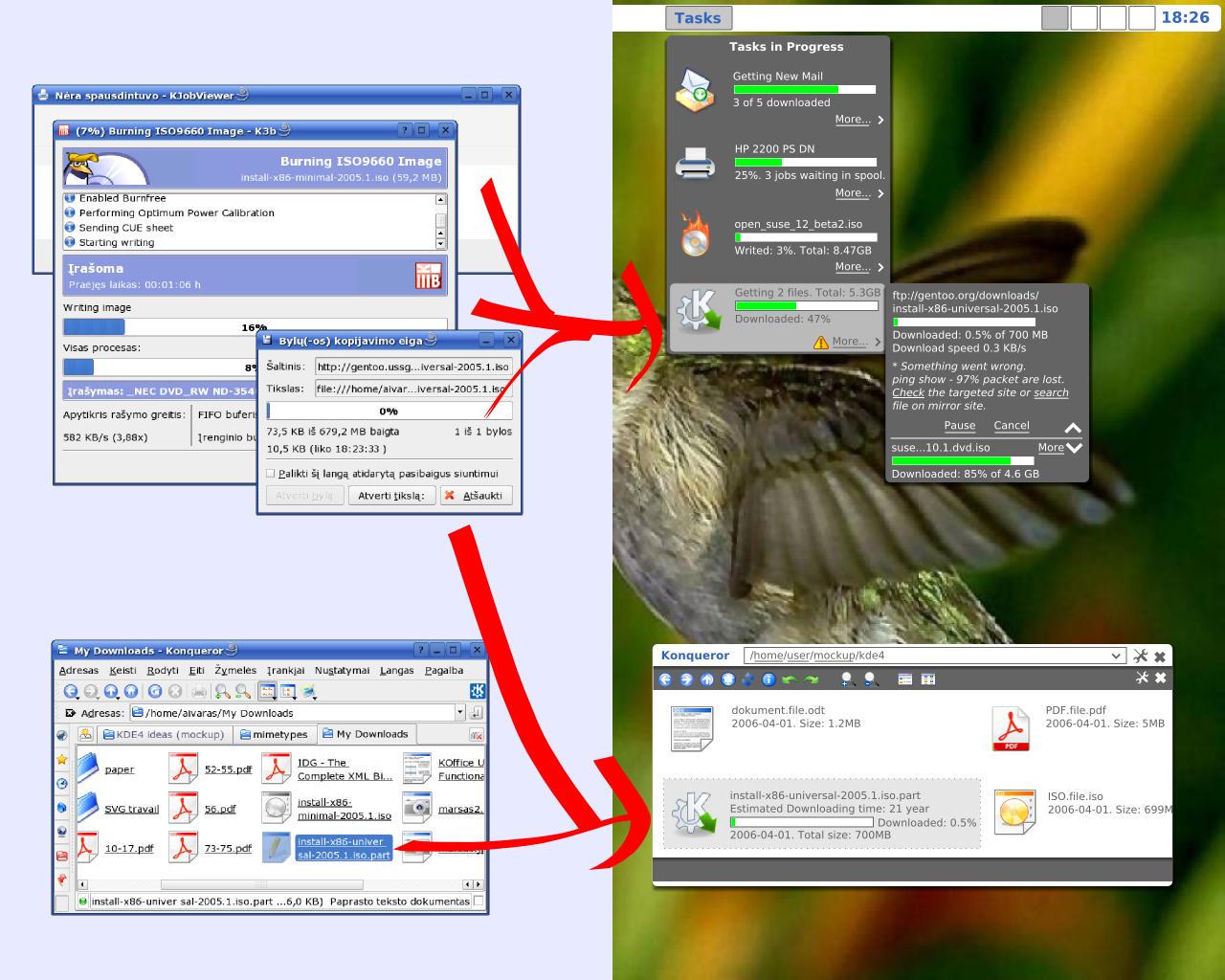
Please keep in mind that the above is a mockup, and does not
necessarily reflect the ultimate look-and-feel goals of KDE 4,
Plasma or Konqueror.
Currently, it is being prototyped as a standard system tray applet
(similar to the printer queue in KDE 3.5.5) which would allow
interoperability with GNOME's tray implementation as well. However, at this point only KDE applications can be observed, so monitoring download
progress from Firefox for instance, is not currently supported. That is not to
say it cannot be made to happen in the future since progress is observed using the standard D-Bus interprocess communication architecture. There are intentions to collaborate with the GNOME project's Mathusalem team, a
project of similar scope as this one.
Here is a screenshot of the current appearance of the monitoring
application as it would appear when clicking on the tray applet. As
you can see, it's already looking very useful.
As you can see, the Kopete buttons are mostly just placeholders
at the moment, and only exist for testing purposes. However, when
you click on one of those buttons, it actually sends a signal back to Kopete,
and Kopete itself pops up that smaller dialog you see.
The Konqueror download progress bars you see being monitored represent
an actual file download in progress. They continue even after Konqueror
is closed. Useful action buttons like "Abort Download" are in the
works.
If you'd like to get involved in KDE 4 development, adding
support for the new KJobs progress monitoring is a fairly easy entry
point to KDE programming. It takes only a few lines of code to
adapt an application to display progress, and a few more lines to
make the action buttons useful.
This new progress monitoring technology will be able to be
integrated into Konqueror (like in the mockup), desktop applets, and
anything else that uses D-Bus. I can even imagine a small web-app
that lets you monitor progress remotely...
Rafael's goal after the initial implementation is completed is to
add persistence, such that when a job is complete, it would
optionally stay listed until closed by the user. He is also looking
for feedback on this tool and its implementation for future improvements.
Look forward to more feature articles showcasing more great
technologies for KDE 4.
A quick note on methodology: I make sure to use the KDE defaults for all of my screenshots, even if it's ugly, since then you can get a better sense of progress as KDE 4 evolves and grows from week to week. As a rule, all of the
features I've demonstrated so far are publicly available in SVN, and
anyone can reproduce my results. In today's article, I had to
uncomment a single line of code to enable this in-development
feature, which is an exception to my normal rules. Additionally,
the Kopete progress support is not yet in the official KDE SVN repository, but Rafael uses it to test features.
Comments
ok so this is great I begin looking foward tot he day when things like this would start poping up. I guess all that we need now is the bar plasmoid and some polish to make it great.
"...blicly available in SVN, and _anyone_ can reproduce my results..."
I try but I don't manage.
Seems to fail during the build of kdelibs.
But, the day befor yesterday, Qt didn't compile, know it does, so....
:)
Nice article, and not so ugly sreen shot compared to mockups.
Pre alpha software may be not so smart, because it cause a "I whant one" thing in you, but if theire were ugly things, I would try to compile too :) just for fun.
Don't try to build kdelibs during a monday. That's the day when incompatible changes are introduced. And remember that monday takes 48 hours, since it covers all of the globe in 24 different time zones.
>Don't try to build kdelibs during a monday.
Or: Don't try to build a monday's checkout of kdelibs. :-)
-> svn co -r { [perhaps saturday's date] } URL
is your friend.
This time of the year, the globe has 25 timezones, not 24. New Zealand is actually now in GMT+13 (more than half a day ahead of GMT) because they are in Daylight Savings Time.
Trivia of the year...
> This time of the year, the globe has 25 timezones, not 24.
> New Zealand is actually now in GMT+13 (more than half a day ahead of GMT)
> because they are in Daylight Savings Time.
They are actually in summer time but the GMT+13 is correct, yes ;)
Quite near where the EU goes one back to summer time, they go to DST and the difference suddenly jumps from 12 to 14 hours.
ok, straying too far off topic ;)
... not 14 but 10 hours.
(Geetings to my sister in New Zealand from Germany ;-)
Bye
Thorsten
10 in one direction, 14 in the other (the world is round after all) :D
Help spread the news about this great feature by digging here:
http://digg.com/software/The_Road_to_KDE_4_Job_Progress_Reimagined_Scree...
I saw this idea by Amaury Chamayou on the old kde-artists forum.
Do someone know where all these beautiful mockups are gone ?
You can find some of the stuff from the old kde-artists forum here: http://e-gandalf.net/wiki/index.php/KDE4_Features
Yep, I came up with the idea, and Amaury mocked it up. It was very disappointing to have our hard work disappear, along with lots of other peoples' :/ Nice to see it back, in some form! :)
It's a pity my other idea, about having audio volumes on a per-application-type basis, rather than on a hardware basis (so, volumes for background music, games, im notifications, etc.), didn't survive (or did it??). I was much more interested in seeing that in KDE4 ;)
That said... the other mockup post referenced above has a great new idea, of having konqueror show file progress IN the file browser. As long as that's not the only place it's available (since I don't use konqi as a file browser all that often), it's really nice.
"It's a pity my other idea, about having audio volumes on a per-application-type basis [...] didn't survive (or did it??)."
Phonon will probably be able to support this, it has categories for different types of audio, so it should not be difficult to set the volume according to that category.
see http://phonon.kde.org/cms/1030
it'll support it, already does... i see now several categories in kmix from KDE 4 ;-)
I really like this KDE4 series, it's brilliant.
Tanks
Thanks for keeping everyone informed Troy :)
(Event though as a compulsive kde/trunk builder, I have seen much of it before)
Yeah it's really nice, and it just shows that KDE 4 is not just a hype, but that a lot of the stuff promised is going to be there.
as an incredible achivement of flexible libraries and forward-looking development. Wow, KDE does rule *soo* much..
++
These articles have been amazing, can't wait for the next one :)
KDE 4 would already have been released !
Yes, and if we had even more developers, it would have been released in the middle of the last year.
But the question is: If we had even even more more developers, is it possible to release kde before the first release and feature plan was made ?
of course!!! we would have had KDE 4 in 1995... :D
http://en.wikipedia.org/wiki/The_Mythical_Man-Month
Actually some or all of that isn't applicible to Open Source Development.
Could you extrapolate a bit on this?
( I am actually interested. )
Thanks a lot! This series definitely has me psyched!
vertial running text is a design flaw in many case; allthough we can do it quite easily with oure strong qt backend i argue against all its use (in horzontal languages).
there are about 3 words we can easily read vertical:
B
A
R
,
H
O
T
E
L
and
S
E
X
the others take significantly more time to recognise.
(ok i understand that my examples are not exactly fit for use in this arguement :-/ sorry, i hope you get my point though...)
Hehe :)
While funny, he's absolutely right. In some apps you use more often, you simply memorize in which region you have to click to change the sidebar view. But actually having to read the labels on these vertical tabs, sucks. It would be much better to spend a bit more horizontal space and use well chosen pictograms, instead labels. Problem is the (non-)accessibility of pictograms.
It's not the same kind of vertical text. That text is rotated, which is easier to read than vertical text, IMO.
indeed, that's what i meant by:
> > i understand that my examples are not exactly fit for use in this argument
still the other kind of vertical that is used in the mock-ups is not quickfast readable/recognizable. people even tend to turn their head for these kinds of tasks: really!
I think entries are meant to be primarily recognised by their icon. In that case tilting your head to read the text seems fairly acceptable as it shouldn't be happening too often.
In fact, I did turn my head! I see the space saving, but it is not read at glance.
In many programs there is the concept of queued tasks, (downloading usually) and in others, it would be really useful to have this feature. The one that I run into time and time again is copying a file on the local hard drive.
Suppose I need to copy two large files to different locations on the same physical hard drive. They each have different start and destination locations. In konqueror (and any file manager) I can copy one, and it starts copying at a decent speed. Then I copy the next one and both slow down by an order of magnitude because now the disk is thrashing back and forth doing two transfers. If each transfer on its own would have taken 2 min, I would now be waiting probably 30 min for both of them to complete.
What we really need is a way to queue file transfer operations for media that has issues with two operations at the same time. HTTP downloads can already do this, if you start more downloads than the server will allow from your IP, then some of them will not start until the others finish.
I guess implementing this is more in the scope of konqueror, and not this job manager.
This is not true. Modern Linux and UNIXes have advanced disk scheduling algorithms based on "elevators" (think of an elevator sweeping up and down a building) that avoid the thrashing and in practice two or three files copied simultaneously have almost no impact in total disk throughput. They also minimize the effects of disk fragmentation (though not so much).
Well it sure is true on my system. Maybe I don't have this disk scheduling enabled or something.
But just try it, if you copy two files on the same disk at the same time, they don't slow down more than 50% each? I find that hard to believe, as it completely contradicts my experience on every system I've ever seen.
Can anyone back this up?
I can back you up - it's an annoyance. Performance drops through the floor when copying multiple large files simultaneously.
It would be great if this job progress manager allowed one to pause a job until another one had finished.
Maybe:
RMB->file copy job->pause this job until this job has finished->another file copy job
This would have other benefits - you could start downloading a large .tar.gz, ask ark to extract it and then pause the task until the download had finished.
Reminds me of the time I ran Nautilus (GNOME file-manager for you KDE guys :) on a multi-processor system, on a CDROM mounted directory.
Now, someone was smart and made Nautilus launch thumbnail generators in parallel, one for each CPU, and that is a good thing. Worked great on hard disk or network folders. However, on the CDROM I thought the system was going to crash, it got so laggy.
Read a bit of file here, seek, seek, seeeeeeeeeeek, read a bit of file over here, seeek, seeeeeeek, seeeeeeeek, repeat.
:)
In my experience it's often the opposite of what you state (1 transfers at X MB/s, 2 at 1.5 X MB/s which often confuses me, though at some point adding more does cause it to go slower), though I think that a configuration option (probably would have to be in Konqueror, with the options based on the kio-slave) to say the number of concurrent transfers before queuing up new ones (with an option to allow 'infinite')
you are wrong. although the elevator algorithm is rather good, you will still loose a lot of performance when copying two sequential files. reason being that for a single sequential file copy there is no seek time at all and the seek time is significantly larger than the time it takes to read a whole cylinder (ie. multiple sectors).
this problem becomes more significant as hdd size increases.
with a modern (>2.6.18) linux kernel and using the (default) CFQ scheduler, the performance difference will be very small (eg a few % max). so, not to worry about.
Can you expand on this? I don't really know how CFQ works, but, the "Fair" in its name makes me think that it would not be the best choice for this scenario. Basically, we have two large tasks, with a very high switching cost between the two. To optimize performance, we should minimize the number of switches, that is serving each task for a very long time interval before switching to the other (the best being serving one task until it is completely finished and then going to the other). This does not sound "Fair", to me.
but it is what CFQ does, both ensuring task interactivity AND increasing throughput. compared to the previous kernel scheduler, cfq uses longer timeslices, but has some logic to ensure reads don't slow down, and there are maximum waits for apps who want to read and write data.
If your system becomes really slow with copying files, verify whether you have DMA enabled. The Linux kernel does a decent job of scheduelling IO.
In fact, once I had to copy a lot of files in Windows and back in Linux. Windows Explorer and IE froze while copying, and the disk made a lot of noice. Linux was very quiet, and only showed short disk activity after 5 files (~30MB). Copying the files took 3 times longer in Windows because it used the disk very inefficiently.
Yet another example of inefficient M$ products :)
It'd be great if the taskbar were updated to take advantage of this so that each application could display at least one progress bar there, and maybe a mouseover would show you all of the progress bars for that application, as well as let you select the the one to be always displayed.
While I'm asking, it'd be nice to see progress bars in the tab bar for every page that is loading :)
Agreed. That would make perfect sense. Something like this?
https://addons.mozilla.org/en-US/firefox/images/preview/1122/3
Hi,
I just want to thank you all your feedback. I am really glad to see people in general like what is going on at KDE trunk, and for KDE 4 series in general.
* The plasmoid is the idea. When plasmoids specification are available, I'd like to write some kind of plasmoid for this, or maybe move what I have right now there, we will see. But I think you can bet for a plasmoid about jobs.
* The queuing. Well, it can be implemented in the kuiserver, and I really think it would make sense here. I think it is really possible, and that I'm going to improve it to let you have an option for "Queue transfer jobs as they arrive", with the possibility to "Resume" the one that you want if you want to have some jobs on parallel.
I really appreciate all your opinions and ideas.
Thank you all again,
Rafael Fernández López.
Hi Rafael,
First of all, THANKS. You're doing an awesome job of an already nice idea and I'm highly looking forward to seeing your work make my life with the KDE desktop (even) easier. :)
Speaking of optionally queueing tasks: shouldn't that be based on the *ressource* being used, where ressource would be 'disk I/O' or 'network I/O' and such? Sometimes it makes sense to download as much as half a dozen things at the same time, while moving no more than one local file at once. Well, hope I'm not talking out of my ass anyway...
Thanks again!