Since not all of the development for KDE 4 is in base technologies, this week features two of applications from the KDE-Edu team: Kalzium, a feature-filled
chemistry reference tool, and KmPlot, a powerful equation graphing and visualization program. Read on for the details.
These educational tools have received a lot of work for KDE 4. In particular, Kalzium and KmPlot developments are happening at an amazing rate.
Kalzium (the German word for Calcium) has been a part of KDE since version 3.1 and is now one of the most useful applications developed by the KDE-Edu team. Initially it was just a program that displayed the periodic table, alongside some useful numbers like atomic weights, boiling points, etc. It was later extended to include a lot of background information on the elements, and more detailed chemistry information (such as emission spectra) which made it a very useful chemistry reference.
In KDE 3.5.5 (which I used for these screenshots, even though 3.5.6 was released last week), Kalzium looks something like this when first loaded:
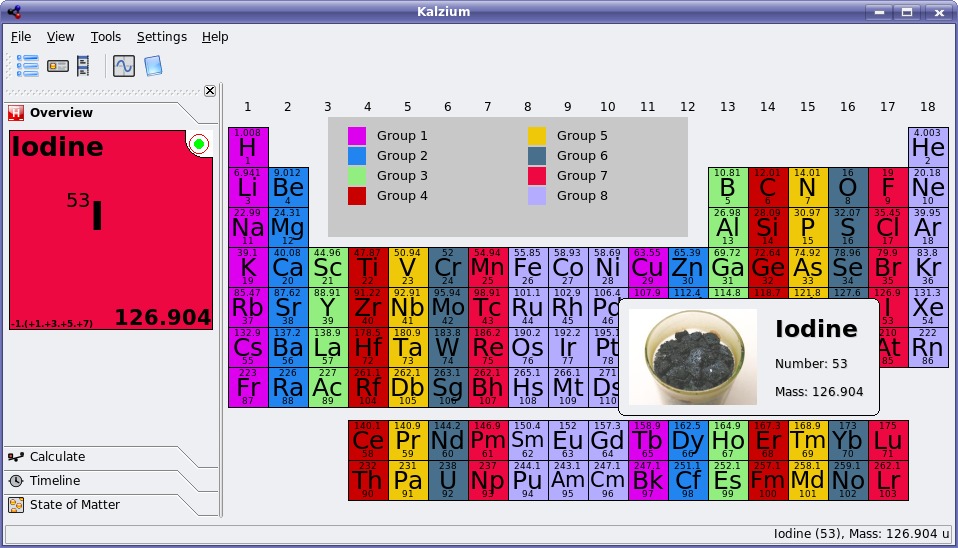
You can see that the interface is pretty simple, and presents a lot of information. If you click on an element it brings up even more information on its properties.
The main user interface in KDE 4 does not look that different, except for the fact that Qt 4 introduces some appearance changes, and there are some more icons (some that haven't been drawn yet) in the toolbar. Here's a peek at Kalzium in the KDE 4 development series:
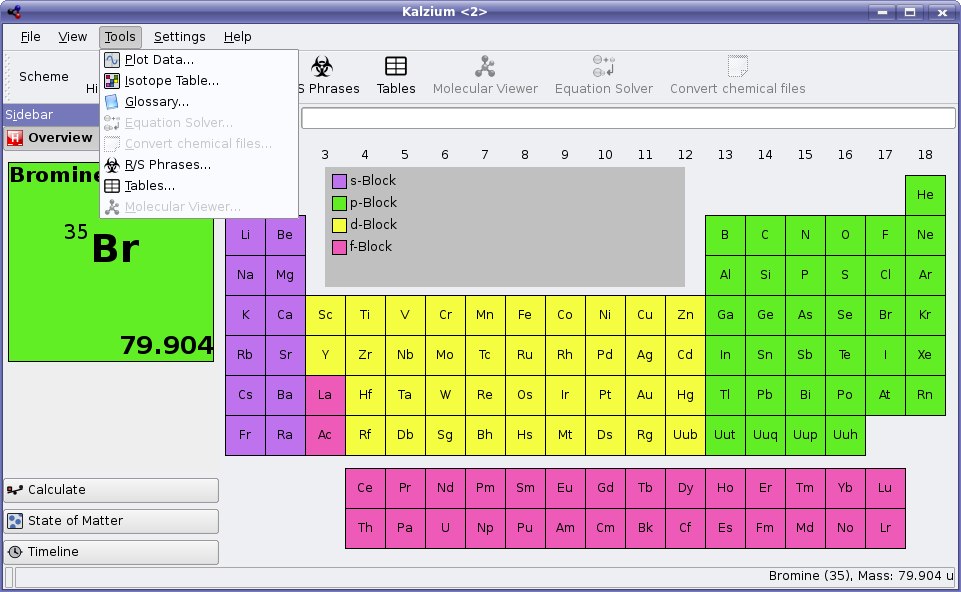
So Kalzium is visually quite similar between versions at this point. However, the important thing to note in the KDE 4 screenshot is the tools menu. In KDE 3.5.5, this menu contains only Plot Data and Glossary.
Plot Data shows the elements plotted in a variety of useful ways, such as mass, radius, electronegativity, etc. while the Glossary shows definitions for many of the more common chemical terms. It is apparently missing the above mentioned electronegativity, so evidently there is still room for improvement here. Making improvements to the Glossary would be a great opportunity for a chemistry-inclined person to contribute to Kalzium in KDE 4 without having to be a programmer.
Anyway, back to the new tools. I'll focus on a few of the newly developed tools that will make Kalzium even more useful in KDE 4:
The isotope table will display a list of isotopes and their decay methods - as a geologist for example, it is important for me to know that Potassium-40 usually decays by electron capture.
The new equation solver is also quite useful, as seen in the following screenshot provided by Kalzium lead developer Carsten Niehaus:
You basically just punch in a chemical equation leaving letters in place of the numbers you are looking for, and it spits out a response. In high school chemistry, students are expected to be able to solve these sorts of equations manually, but like most equations, once you solve enough of them, it simply becomes tedious. This equation solver can save a lot of time for complex equations.
And finally, the most visible change to Kalzium is the inclusion of the Kalzium 3D work, which turns the program into a 3D molecule viewer. Initially, it was developed by the Kalzium developers for use in this application only, but some collaboration has since happened and it will now be using libavogadro a library jointly developed by the Kalzium and Avogadro developers.
According to the Kalzium developers work is progressing on porting the 3D modeller to use libavagadro, an effort led by Donald Curtis, providing a more general/powerful framework for rendering/manipulating molecules with Qt and OpenGL library. It is shared between Kalzium and Avogadro (and more). Avogadro is a much more advanced molecular modelling programs, useful for creating the actual molecule files, and doing quantum chemistry. Kalzium 3D will simply act as a viewer for files constructed using these programs.
Kalzium developer Benoît Jacob submits the following screenshot showing the 3D molecule viewer in action using the new Kalzium 3D functionality. This functionality is already SVN as this article goes to press, however work continues with libavogadro integration.
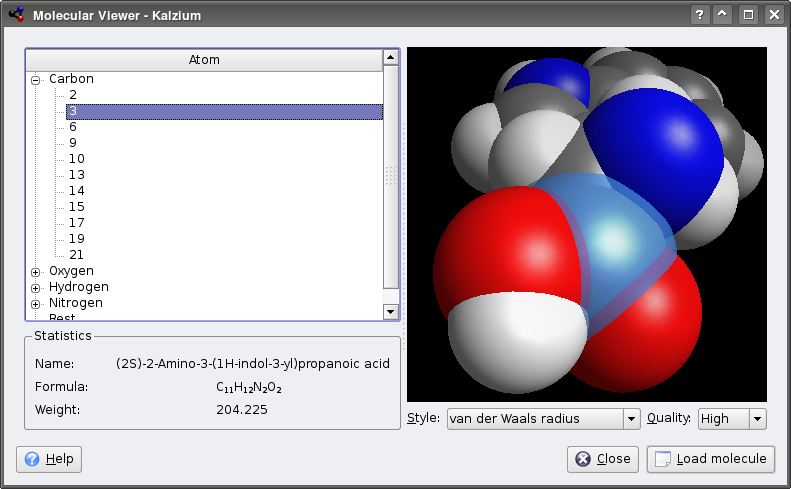
Kalzium will likely ship with a library of common molecules ready to view provided by the BlueObelisk project. Thanks to the OpenBabel library, it should also be able to open molecule files in a huge variety of formats (I counted 62 file formats that it already supports).
On to our next KDE-Edu feature: KmPlot. For a while already, this application has had the ability to plot regular functions, parametric functions, and polar functions, as well as show derivatives (or regular functions) and a few other goodies. It has been useful as an equation visualization tool, but the interface has been awkward, with many little cluttered dialogs to fight with.
Below is KmPlot in KDE 3.5.5 with it's default settings, and three functions plotted, one of each type:
The dialogs used to plot these equations look something like this, except there is one unique dialog for each type of plot:
Here's a quick look of the new KmPlot interface with the same three functions plotted. No more dialogs to mess with, and the plots can be in shapes other than square! Plus Qt 4 gives everything a nice anti-aliased touch.
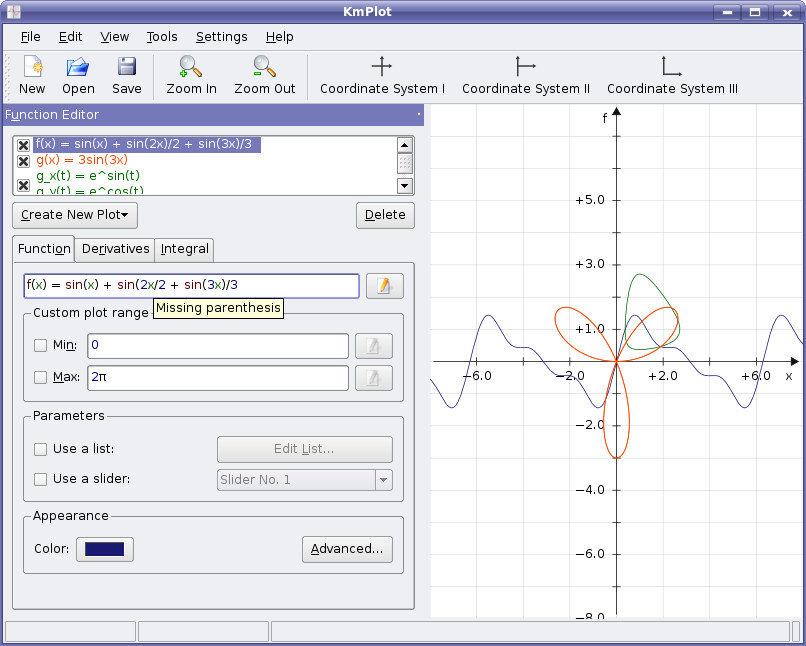
KmPlot has received a huge amount of work, and should be one of the KDE 4's killer apps for students, engineers, and more. It plots differential equations now, has a new equation editor, and (as seen in the above screenshot) gives tips as to how to correct your equations.
The new equation editor is shown below with a differential equation being edited:
As you can see, it's much easier to enter an equation when you can design the functions in a nice syntax checking editor like this one. There is a lot more work going into KmPlot than I can describe in just this article, so if you are interested in more information, check out its development status page.
KDE-Edu is a growing project, with many great applications being developed for a wide variety of age groups. They will have support for Windows and Mac as well, thanks to the improved QT 4 and KDE 4 libraries, and should become more popular programs as a result. Since there is so much great work happening here, expect some other KDE-Edu applications to show up in future articles.
Comments
http://digg.com/linux_unix/The_Road_to_KDE_4_Kalzium_and_KmPlot
No
> Making improvements to the Glossary would be a great opportunity for a
> chemistry-inclined person to contribute to Kalzium in KDE 4 without having
> to be a programmer.
Or, if you're not chemistry-inclined why not suggest words or terms that you don't know and include those terms in the glossary? that way terms commonly known to chemists are not overlooked.
thanks for the great work!
Especially the 3D viewer. Is there any chance of having a PDB viewer (Protein Databank) integrated into KDE? That would be really great. Apart from that, great work. Can't wait for KDE4
It seems to me that all these molecule databases would be a perfect candidate for the GHNS (Get Hot New Stuff) feature. It seems a bit unnecessary to include everything in the chem world in kdeedu. It's already big enough as it is.
Sounds like a good idea, I'll forward it to Carsten if he hasn't already read your comment. I guess we could make it so that the first time the user launches the mol viewer, he gets proposed to download molecule files.
Well, *some* molecules should of course be shipped with Kalzium. It's just that all these databases are terribly big, and not especially useful for everybody.
Sure, we'll ship at least a few molecules. By the way, the whole gzipped archive weighs 300 kb.
So maybe a good behavior is to show by default ony a few mols, and then put a button in the GUI saying "download more molecules".
Well, we need to think more about this.
We use OpenBabel to load molecule files, and OpenBabel supports 62 file formats as Troy counted. I checked, PDB is among the supported formats.
http://openbabel.sourceforge.net/wiki/Category:Formats
That is understood. Openbabel does convert and support many formats, but it looses a lot of annotations on the way, such as residue information.
The 'molecule' screensaver in xscreensaver does a similar thing by showing PDB files. But PDB viewers show more than just the atoms in the molecule as most molecule viewers do. e.g secondary structure as ribbons, backbone trace, residue annotations etc. A PDB viewer is more than a molecule viewer. There are a lot of pdb viewers there, but none which integrate with KDE or konqueror like Chime (http://www.mdl.com/products/framework/chime/) does with IE on windows (jmol (jmol.sourceforge.net) is good enough though). A Plugin or kpart like that could help such projects like the gromacs gui ( http://kde-apps.org/content/show.php?content=47665 ). This doesn't make sense for kalzium maybe, but the libavogadro thingie looks promising.
ah ok, thanks for explaining. I'm no chemist and I'm only doing the math and OpenGL stuff here, but I'll point Carsten and Donald to your comment.
Well, there is Bioclipse (http://www.bioclipse.net/): http://bioclipse.net/index.php?option=com_content&task=view&id=11&Itemid=5
Of course, that is not in Konq, but for that you can of course use JMol (http://jmol.sourceforge.net/). Look at the screenies if you want to see it in action: http://jmol.sourceforge.net/screenshots/
I have mentioned and use jmol. I didn't know of bioclipse. Thanks.
I've been working on pulling some extra information (annotations?) into OpenBabel. I know that there is already work for residue information (although i haven't worked on that directly). libavogadro will support it, and thus kalzium.
just a short note the feature is coming to a library that is used by a library that is used by our favorite KDE application AND 'competing' apps.. That's the real power of FOSS. Sh1t, I just love this. It's like 'sweets hitting the fan' or so...lol.
When I started that 3D-feature I wrote my own cml-parser. After some days I thought that is a really stupid idea and ported Kalzium to OpenBabel. It took me about 2 hours and five emails.
In the end OpenBabel has a couple of bugs left, the API-docs are now cleaner (because of my stupid questions ;-) and OB even has some new features I needed. Avogadro is also using OB, as is GHemical and others.
If you have particular "problems" with Open Babel, you really should report them to the bug tracker. Please don't just gripe about the project on a random forum -- your bugs won't be fixed that way. Better yet, please give us example files of stripping out annotations and tell us what we should do instead. Residue information certainly should be retained when reading a PDB file. Check out PDB -> Mol2 for example.
Yes, Avogadro does have options for rendering a residue at a time, or secondary structure, etc. We've planned it that way. But Avogadro is also based on Open Babel, so if you really think there are problems in the underlying library, it'll be a problem with Kalzium, Avogadro... well quite a few viewers.
I like to think Open Babel as a project is pretty good about responding to critiques and suggestions. So please tell us what we're doing wrong so we can fix them!
http://sourceforge.net/projects/openbabel
I am working together with Jerome and his project:
http://chem-file.sourceforge.net/
Currently, that project ships 524 structures. If you are missing any structure tell me and I promise it will be there ASAP.
Does anybody know, if LaTeX support is planned for KmPlot or Kalzium (exporting molecules).
That would be really cool!
Kmplot would benefit from sharing some code to edit formulas with KFormula from KOffice. It's basically two different implementations that do the same thing. Probably also two different implementations to save them in various formats, parse them and possibly other stuff too.
PS. KFormula does have export to Latex even if I hear that there is a bug in it.
http://bugs.kde.org/show_bug.cgi?id=136710
The bug appears to be that it is disabled.
That would only work for 2D-structures, right? Well, if OpenBabel gets this feature I would implement it in Kalzium, yes.
Yes,only for 2D-formulas. Do you know:
http://imt.chem.kit.ac.jp/fujita/fujitas3/xymtex/indexe.html
Some thing like that would be pretty cool.
Well, Kalzium would inherit this feature automatically if Open Babel had it.
So my best suggestion is to either push for this or find someone to implement it in Open Babel:
http://sf.net/projects/openbabel
The particular file format request looks like this:
http://sourceforge.net/tracker/index.php?func=detail&aid=1451051&group_i...
However, it lacks a lot of detail! If you have a few minutes to flesh out the request, including the "LaTeX" format you want (Fig?) and how this might work, it would be greatly appreciated.
-Geoff
Kmplot will export to an .eps file, and you can include that in a LaTeX file. That's really the best way to get graphics into a LaTeX file anyway.
The new interface of kmplot looks pretty cool and the feature listing is impressive. I just wonder why it does not support plotting of x,y-data (or have I overlooked something on the feature page)? To me as an engineer kmplot would be much more useful if I could compare experimental (x,y) data to mathematical functions, which kmplot plots so well.
The next version of KChart will hopefully be able to do that. KOffice 2.0 is not released yet, but then again, neither is kmplot 4.
Do kmplot and kchart share libraries? I hope there isn't extra duplicated effort in drawing graphs, and the kmplot graphs look much nicer than those in kchart 1.6.
Looking forward to KOffice 2.0!
Kst from extragear is a very powerful tool for data plotting, which you might find useful
One really good solution I have found is www.zunzun.com . The website author uses open-source tools to display and fit data, as well as data analysis statistics and graphs. I used it to do data analysis for a paper I recently prepared, and recommended it to the lab supervisor at my university for use in the undergraduate physics labs.
Another good option is Gnuplot. I've also done plotting in Kile, the KDE Latex interface, though it was function plotting and not fitting. While I agree that it would be a good addition to KDE, I have to give a shout-out for some tools that have been very useful for me.
I'm glad you found my web site useful. The site fitting code is available under a BSD-style license at http://sf.net/projects/pythonequations.
James
With _real_ mathematics open source projects like Axiom (CAS), Maxima (CAS), and Scilab (matlab like, feature-full and fast, unlike the stagnated Octave), and R (full-blown professional statistics environment - but in serious need of some spreadsheet interface) it's a real shame that KDE chooses to waste time with replicating functionalities that are already in other software, when eforts could be made to further those serious packages.
Stop writing toys. Stop playing.
The projects you mention have nothing to do with Kalzium and Kmplot.
Obviously you haven't RTFA.
KmPlot is designed for quick-and-easy plotting for simple math, not full blown math suites. If you want to do serious math, you use a serious math program, not a program that ships as part of an educational suite.
You wouldn't use javascript to write a kernel. Don't use KmPlot for your math thesis.
https://www.youos.com/ -- operating system written in javascript :-)
still, the direct competitor is gnuplot...
"Stop writing toys. Stop playing."
Excuse me? Are you telling developers they can't have fun? Be a little nicer when you make requests!
You should mention Python + SciPy + NumPy + Matplotlib. This should be the winning combination, IMHO. At least, this the best I found in open source, after having wandering for a while (Scilab, Octave, Gnuplot, R and others)! I encourage people to write libraries/toolboxes in this framework. Scilab and Octave fail to compete with Matlab, even if Scilab is good. I think that Python with brilliant libraries such SciPy is the best path for open source software to compete with Matlab. The work is well advanced, but help is needed!
Your sentences "Stop writing toys. Stop playing." had to lead to disagreements! On one hand, you cannot blame people writing new software _for you and for free_. On the other hand, developers with ambition bring useful tools, which is better including for them, in the end. But, in my experience, many many developers do not understand that. I do not know why. Open source might suffer from a lack of steering people, just like there are good managers in firms that prevent talented people from wasting their time.
Um, except that Scilab is not a "real" open-source project. In fact, it is not "open source" at all according to the commonly-accepted OSI definition, despite the Scilab web page's prominent claim to be an "open source platform".
In particular, their license prohibits commercial redistribution of modified versions.
(And if you're about to object, "But who cares about that?", think about it: it gives a single organization, INRIA, an effective monopoly over commercial support for Scilab. If all free software had that restriction, commercial Linux distros would basically be out of business and the world would be quite different.)
Telling volunteers what to do (and especially what not to do) is the height of superiority and ignorance. I haven't used KmPlot, but Kalzium is actually really handy.
I agree that a KDE computer algebra system would be really nice. I currently use Mathematica, and its interface frankly just sucks. It totally breaks down if you commit the sin of turning the numlock key on (yes, its a math program that doesn't let you use the number pad!) and its the only program I've seen to misbehave with Beryl. A KDE frontend to Maxima would be killer.
Have you tried Kayali?
http://kayali.sourceforge.net/
I totally way disagree... Plenty of programs _nominally_ have KmPlot's functionality. KmPlot is the _only_ program I've seen that does plots easily and quickly, and that allows you to change the coordinate plane dynamically and to trace Y-values along a function curve. I'll grant that I'm not a super open-source uber expert, but I know that ease of use counts and the time I would waste trying to figure out how to do plots in other programs (most implementations I've seen are simply frontends for GNUplot) is time I could have spent working and getting things done. KDEplot is simple, extensible, and powerful, and that's very important. Saying it's a "wasted effort" belies all the time and energy it has saved me in my math classes, but moreso it belies all the money it saves for all math students who need a quick and easy plotting program at home and don't feel like paying $80+ for a graphing calculator. (Remember, not everyone is going to learn about GNUplot frontends. Personally, I can barely get my brain around it and it's so frustrating, I'd much rather use KMPlot's simple, friendly, and dynamic interface, where I can add functions, change the grid, edit functions, etc. on the fly and with the fewest processes possible.)
Personally, I love Maxima... I use it and KMPlot together as something of a tag team for massive math productivity. A KDE frontend for Maxima would be killer, and one that would integrate with KMPlot would be sublime (in fact, combining such tools to create an integrated math toolkit, like Mathematica, would be a great goal). Just, please don't insult the work that KMPlot's team has put into this piece of software. I know it's not wasted effort because of how important it is to my math education. KMPlot is easy, simple, and fun to use, and that matters. I can't wait for the new version. And if you think developers should "stop playing" or "stop making toys".. you might want to realize that Linux basically started with some guy (that is, Linus) seeing if he could make his own OS just for the fun of it. There's value in toys and in tinkering; if you enjoy making your software, you'll make software that you will enjoy using, and that is the software that will be useful.
Sure, other programs do what KMPlot does... just not as well.
At the Tools menu there is a R/S Phrases with an important simbol as the icon.
The icon used at R/S Phrases means Biohazard, it must be used only with biological threats like pathogenic baterias, virus, genetic modified foods, pieces of tissues from a sick guy and so on.
When you use a simbol for a diferent meaning, like the heavy rock band Biohazard, this simbol become weak. I think this simbol for R/S Phrases must be changed.
If you link this simbol with a rock band or a R/S Phrases you get a wrong meaning at your mind. If you see a package with this simbol at the streets you think: "Cool man, let me see what I got today.!" and hoooo hoooo you are infected.
This can sound geek, but this simbol is an international standard.
Thanks for the amazing work folks.
KDE must go on.!!
:-)
R/S means "risk and safety".
http://en.wikipedia.org/wiki/Risk_and_Safety_Statements
So I think the icon is appropriate.
That simbol means "Biological Hazard".
This is compliant whith the ISO 3864, wich specifies international standards for safety symbols.
-> http://en.wikipedia.org/wiki/Biohazard
""A biological hazard or biohazard is an organism, or substance derived from an organism, that poses a threat to (primarily) human health. This can include medical waste, samples of a microorganism, virus or toxin (from a biological source) that can impact human health.""
It's not relatad to other kind of threaths or hazards, like chemical products or radioative metals.
We have the radioactive simbol, the toxic simbol, the chemical hazard simbol.
Please, check this page:
-> http://en.wikipedia.org/wiki/Hazard_symbol
:-)
thanks for explaining; i'll report to Carsten if he doesn't already know.
What's up with those -> arrows in the equation editor? We have Unicode (→) for a reason. Or is KDE not up to 1991 standards yet?
It's because most keyboards do not have a key to input an arrow, that's all.
How would you write an arrow in a text box on most keyboards? -> obviously. :)
Using the same arrow in the output - well, that may not be necessary.
"How would you write an arrow in a text box on most keyboards? -> obviously. :)"
alt-gr+i works quite well. It is the default on quite a few X keyboards layouts.