Focusing again on applications this week, specifically I'll look at two of the promising document viewers for KDE 4, Okular and Ligature.
They are two of the rising stars of KDE 4, but they both have their
roots as KDE 3 applications that have grown up. Read on for more...
In the past, KDE has had a wide variety of programs designed for viewing all sorts of file formats, and using the KParts technology of KDE, these viewers were able to be embedded into other KDE applications such as Konqueror as and when they were needed. Supported formats included TIFF, PDF, PostScript, fax, DjVu files, and many more. okular and Ligature have grown up from some of these earlier designs to become much more than simple document viewers.
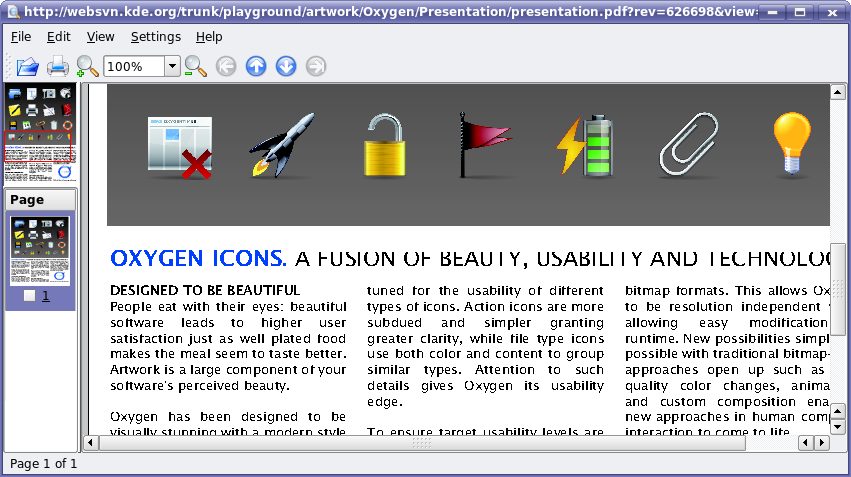
Historically, KDE has shipped with a program called KGhostView, which used the GhostScript backend to render PDF and PostScript files for display. KDE has even used it as the Print Preview utility. What follows is a shot of KGhostView in action for KDE 3.5.6. Please note that some of the font rendering glitches may be due to the font selection of my distribution, and are not necessarily a reflection on KGhostView's ability to render this file.
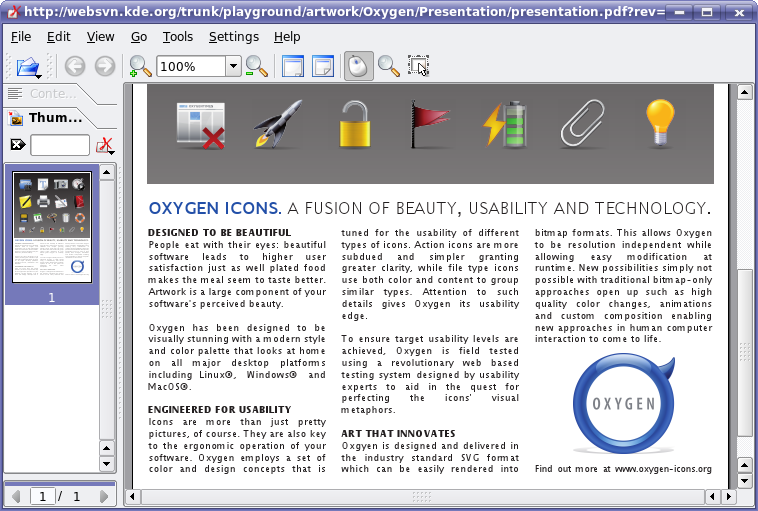
In the KDE 3 series, a new contender emerged for viewing PDF files that was much faster than KGhostView. This new program, KPDF, has since eclipsed KGhostView in many important areas, like functionality, speed, and so on. KPDF is shipped with many modern distributions as the default PDF viewer for KDE. Below is the same file as viewed with KPDF.
From personal experience, KPDF has been the subject of some of the 'oh wow!' type experiences I've had while using KDE. I've clicked on web links to PDF files that specify 'frame' as their target, and had KPDF embed quickly and seamlessly, so much so that for a moment I forgot that the frame wasn't HTML anymore.
It also has quite a few advanced features that KGhostView never really pulled off, such as text searching, copy and paste from PDF, and more. It is also many times faster at rendering, especially when loading PDF files containing a lot of vector imagery. I use a lot of maps in my work, which often ship as PDF files - using KGhostView to view these files was incredibly slow, as you could literally watch the vectors being drawn on the map. KPDF would load the same map visible instantaneously, letting me do my work instead of waiting for the computer.
KPDF recently made the decision to broaden its support and start to view files of types other than simply PDF, partially thanks to coders sponsored by Google's Summer of Code program. The main reason they decided to do this inside KPDF instead of starting new, individual applications is that KPDF already had many advanced features implemented that didn't necessarily need to be duplicated for these other file formats. To more accurately reflect its broadened scope as a viewer for many file formats, it has been rebranded as 'okular'.
Users of KDE 4 are in for a treat with both okular and Ligature, as they are both shaping up to support a wide variety of (occasionally overlapping) media formats. But since they can both be embedded into KDE applications using standard interfaces, a user should be equally happy using either one of these viewers. I'll talk about okular first, since I have more information sources for it. Huge improvements are noticeable in okular over the already very functional KPDF. So far, it looks to be one of the best applications of KDE 4.
Pino Toscano (pinotree on irc.freenode.org) is the lead developer of okular. Currently it is being developed in KDE SVN and its sources are available in
/trunk/playground/graphics/okular for anyone who is interested in trying it out. It is already quite stable in the KDE 4 environment - actually it is one of the most stable KDE 4 applications I've had the pleasure of testing so far. It is also known to be building as part of the KDE/Mac packages. Benjamin Reed submits the following screenshot showing okular in action on the Mac:
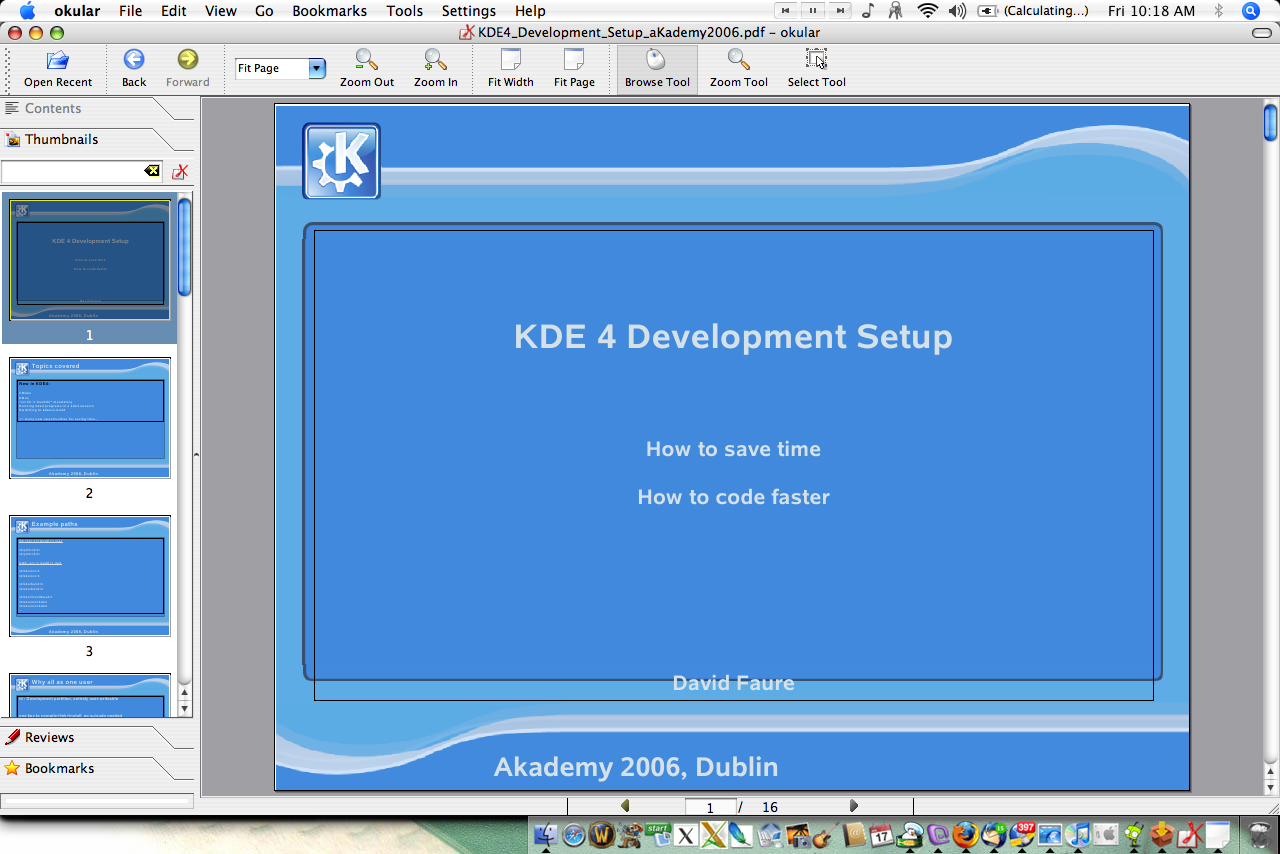
He also adds: "Holy crap, okular is fast on OS X. No more Acrobat for me! :)"
I didn't test all of these formats myself, but according to its Supported Formats list at the okular website, it already has full or partial support for the following 11 document types: PDF, PS, TIFF, CHM, DjVu, DVI, XPS, OOo, FictionBook, ComicBook and standard graphics files. Work continues on making sure that support for all of these formats is flawless, and more formats may be added down the road. The okular that is released alongside KDE 4.0 may or may not have all of these formats enabled, depending on their stability at that time, as well as choices that your distribution may make.
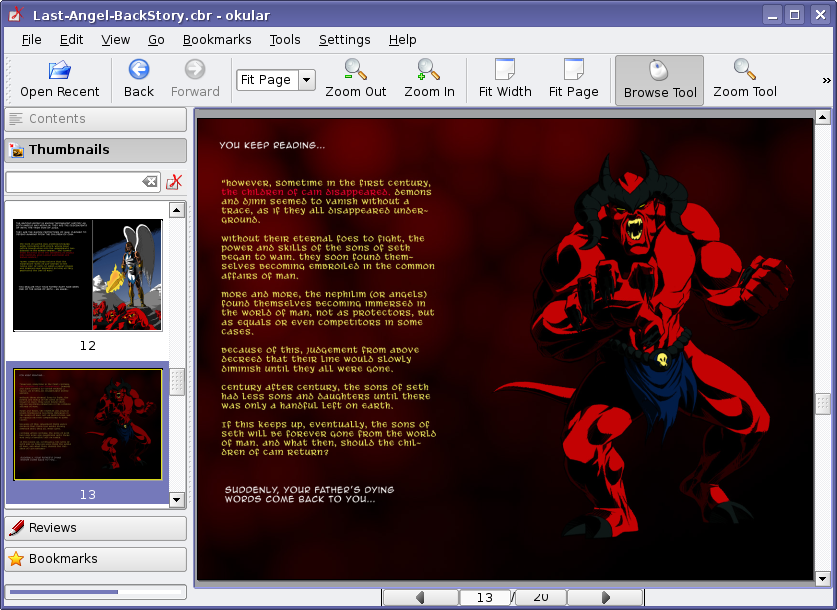
Below is a shot of okular viewing the ComicBook format, often used to distribute comics online. Indeed, okular may end up becoming one of the most popular ComicBook viewer applications, especially considering how many platforms it will run on courtesy of KDE 4.
Pino has shown his willingness to work with the usability folks to help improve the ease of use of okular, and it is now part of the Season of Usability project. It will likely see a fairly-thorough overhaul of many interface elements before KDE 4.0 is released which can only make this application even better.
The other contender for your document viewing needs in KDE 4 is Ligature, recently renamed from KViewShell. It lives in the kdegraphics module, so it is currently the default viewer for the files that it supports. It could however be overridden such that okular is used by anyone who prefers using okular for a given format. The only reason I can find for Ligature to be in the kdegraphics module rather than okular is historical - KViewShell (which Ligature is based on) was part of kdegraphics in the past. However, this doesn't mean KDE is shunning okular either: for example, Amarok is one of KDE's best applications, though it doesn't reside in the official kdemultimedia package.
Ligature currently sports support for PDF, PostScript, EPS, fax, Tiff, DjVu, and TeX files based on the plugins available in SVN. I'm under the impression that 'fax' is for a sequential image type format using TIFF files. Its predecessor, KViewShell did not have support for several of these formats in the main kdegraphics branch, but a separate branch exists for these formats for KDE 3.5.x.
I tried to get a screenshots showing Ligature displaying PDF files, but it wouldn't load them. I tried a PostScript file, and it loaded it but did not display anything. So, I had to resort to a rather boring DVI file in order to show off the current state of the user interface, but this does not show off its rendering capabilities very well.
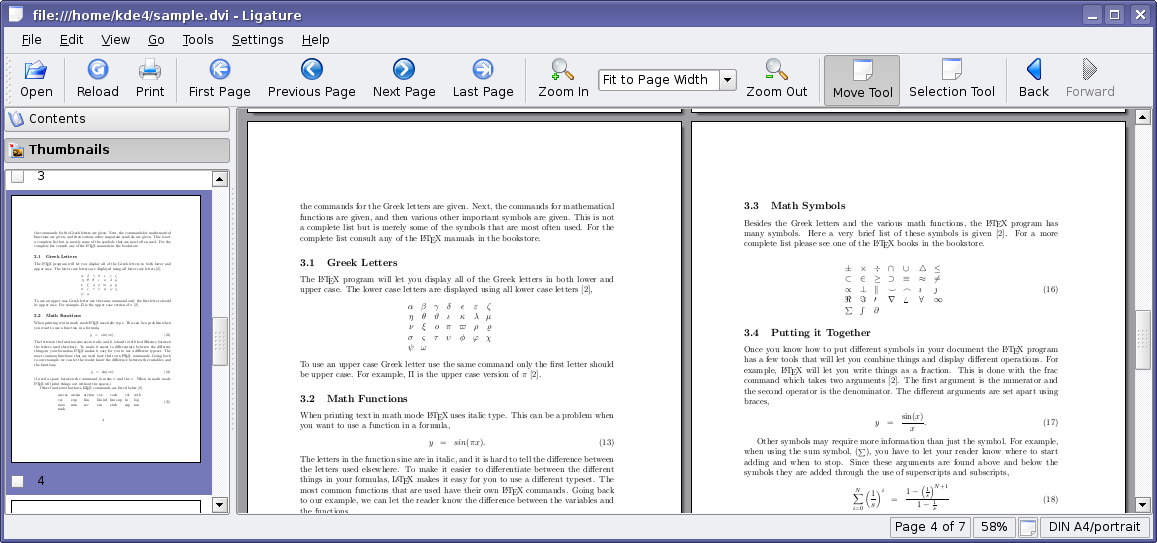
It does bear a close resemblance to okular as far as its user interface is concerned. This is mostly due to the fact that they utilise the same standard Qt and KDE libraries to draw many of the user interface elements. Since I could not get it to render any documents, I could not compare its actual usability to okular. Please keep in mind, however, that it is in a state of development at the moment, so being broken on any given day is nothing to be overly concerned about.
A note about DVI files in general: to view them you need to install some TeTeX files, which on my distribution totals 85 megabytes - a likely reason why DVI files are not a popular format for documents despite their competent rendering abilities. When Ligature finds a hyperlink in a DVI file, it underlined the text in blue to indicate that you could click on it, which while useful in some circumstances, made documents with links look quite ugly. okular on the other hand does not underline links in DVI files, but they still work as expected.
For those wondering about duplication of efforts, okular and Ligature use different internal architectures, but many of the library dependencies depend on are the same (much like how MPlayer and xine have very different internals, but can still use the same low level libraries to decode media). This means that while they cannot easily be merged into one project, any work that trickles down into the lower level libraries will be beneficial to both projects. Regarding availability, okular will be available wherever your distribution packages it, and since most distributions end up splitting packages like kdegraphics into their constituent apps anyway, Ligature will fall into the same category for most users. Of course, GNOME users can also use okular or Ligature as well, if they have the required KDE libraries installed, but of course they can also use Evince which shares many of the same backend libraries, but is better integrated into the GNOME environment.
That's all for this week folks. Hope this clears up any confusion about the nature of both okular and Ligature.
Comments
OK since I'm making the 1st comment, I just want to tell everybody this :
Please don't start another discussion like "Ligature vs Okular", or "which viewer SHOULD be default ?". This type of discussion already happened many times (on mailing lists, commit-digest, etc.), and I don't think they helped.
Please respect the work done on both of these projects. They provide it to you for FREE, and you are FREE to use it or not.
This is what oss is about.
and btw, thank you Troy for the great article :)
I think it's important to understand that 1 + 1 isn't 2 here. If you combine the developers working on Ligature and Okular you won't end up with one project that's twice as productive.
The same can be said about KDE and GNOME. Combining these reduces the productivity as each set of developers have a different vision. Two parallel projects keep each other motivated to become the best one.
It also creates playground to implement new features. Sometimes a project won't accept an idea because it's to controversial. When the developer can implement it in the other project, get successful with it, the first project may copy the feature.
Eh, maybe, but we're talking about document viewers here, not video editors or desktop environments.
Creating two separate applications to simply read the same document files is basically redundant. I don't see what kind of "controversial features" can come out of a program so simple, short of allowing a user to change a background color or something.
Stuff like this is why people say KDE is so bloated, because this is basically recreating the whole Noatun/Kaboodle thing.
> the whole Noatun/Kaboodle thing
I always wonder how anyone could ever see any sort of duplication between Kaboodle and Noatun.
Perhaps some people like to have to click on ever music file separately and really hate playlists, or there are people who really love to have random sound files they have been checking in their filemanager end up in their playlist.
It's like the whole textprocessor/spreadsheet thing: how would anyone ever need a spreadsheet since textprocesssors can also do tables?
spreadsheet analogy doesn't really work... text processors usually can't do formulas in tables... big difference
I understand what you are saying but I still can't see the point of having to programs which seam to be pretty much the same.
I reminds me somehow on kate and kwriter. They both are regular editors and today it seams to me that kate is the only program which is used. So why was there a kwriter in the first place?
It is ok, having a large variety of programs, which might also compete but please not within a project like KDE.
But it is still an early stage and only time will tell which viewer will be used by most of the users.
Well, the kate/kwrite thing is a bad example, as those are pretty much the same. Kwrite is just a lighter version of Kate, and less confusing for many normal users.
even more, kwrite is kate with a simple skin.
kwrite is also magical: if you remove $KDEDIR/bin/kwrite, you can still start the application from kmenu :)
One of the most interesting and useful features, to me, is the use of "editor-like" selection of text, as opposed to the old (and, to my mind, rather confusing and useless) "lasso" selection of text. I believe both Okular and Ligature incorporate this, which is great!
Those are cool indeed, just like the annotation support in okular (why didn't Troy mention this?). There where talks about basic pdf editing support like rotating, extracting or adding pages (like basic graphics viewers can rotate & have basic filters) but sadly they decided a viewer shouldn't edit the files, even tough Okular already DOES change them when annotating them.
Aside from this, I think the development of these apps goes in the right direction, and even tough some day one might be abandoned by it's users and developers, currently they both profit from the competition - as Adobe Acrobat and Evince aren't really competition (both okular and Ligature are lightyears ahead of both in most areas, evince can't do anything and Adobe is a usability- and performance nightmare).
Oh, please, superstoned, you're always trolling around! the only thing okular supports and evince doesn't is the annotation support
> the only thing okular supports and evince doesn't is the annotation support
"only"... our implementation is far from being finished but... do you have an idea of the complexity of the annotation stuff? It seems not,
Btw, and we support sounds, too ;)
Annotations are complex, but we have a Great Maintainer and some willing people!! Btw: annotations need to be reworked a bit :-)
Grande Pino ;-)
"Editor-like Selection of Text",that's we really need.The "lasso" selection of text is so poor,especially for using ktranslator on a foreign pdf files.Adobe does it good.
Long live Ligature, long live Okular! Thanks to all their authors :)
And thanks Troy.
Thanks for sorting this out. I had heard about both project, but didn't know the real difference.
Thanks Troy for keeping us updated.
okular crashes on Prentice.Hall.PTR.C++.GUI.Programming.with.Qt.4.Jun.2006.chm file
That's a bug in khtml, which is used by okular's chm plugin internally.
The bug report was forwarded to the khtml developer already
Ciao,
Tobias
what is the bug number?
http://bugs.kde.org/show_bug.cgi?id=141546
There are a lot of problems with KHTML right now so opening chm files is a problem.
At the moment I still prefer KGhostView for Postscript Documents. PS look ugly in KPDF after the PDF transformation. Does anyone know whether this has changed with Okular ?
Hi,
in okular we use libqgs now, which accesses the ghostscript API directly to render the PS document, so no convertion to PDF is needed any more.
Ciao,
Tobias
http://digg.com/linux_unix/The_Road_to_KDE_4_Okular_and_Ligature_Documen...
hi, will any of these two programs support a firefox-like search bar?
Both have a searchbar on top of the preview sidepane, much more usefull as it also highlights found items in the previewpane and only shows relevant pages. Nothing a firefox-like searchbar would add to that. I'd rather see such a searchbar in KDElibs, and used instead of the currend find dialog in all apps (maybe with an optional fallback to that dialog), btw :D
aha!! I hadn't realized that search bar (it's in KPDF aswell!!) Talk about a naive user, jejeje
I think a nice feature would be that the Ctrl+F shortcut would make the search bar gain focus instead of showing the find dialog. Maybe give the user some feedback about the focus. And maybe add to the search bar two buttons for cycling over the results.
anyway, both viewers look great!
Yeah, cool. I didnt notice it before either. Maybe because my preview pane is usually not so wide. I think it might deserve a more prominent place.
what is definitely missing is the option to cycle through your results. Personally I don't see the feature of displaying only the pages with a particular keyword as particularly useful/usable.
> Personally I don't see the feature of displaying only the pages with a
> particular keyword as particularly useful/usable.
I must have looked at 100+ scientific papers in KPDF, and I really enjoyed this feature. If you've already read the paper it's a lot easier to re-find the place you were looking for by scrolling the previewer, and if you don't know the article it gives a very quick overview of how many times and where your search term occurs. When you're fumbling around in the (huge) literature for something perhaps relevant it's very helpful.
Thumbs-up to KPDF from here, keep up the good work :-)
Ligature and its predecessor have such a search bar since KDE 3.5.
Wilfried,
You mentioned long ago that there might be a Ligature release for KDE 3.x. Is that still the plan?
> You mentioned long ago that there might be a Ligature release for KDE 3.x. Is that still the plan?
Yes, that is still the plan. That was the whole point of doing parallel
development of a KDE3 and KDE4 version in the first place. Unfortunately
I have been really busy in job and private life lately, so I didn't find
time to work on Ligature in the last months.
Hopefully we will be able to release soon, since no more new features are
planed, just stabilization and bugfixing.
>A note about DVI files in general: to view them you need to install some TeTeX >files, which on my distribution totals 85 megabytes - a likely reason why DVI >files are not a popular format for documents despite their competent rendering >abilities. When Ligature finds a hyperlink in a DVI file, it underlined the >text in blue to indicate that you could click on it, which while useful in >some circumstances, made documents with links look quite ugly. okular on the >other hand does not underline links in DVI files, but they still work as >expected.
Hey, this can be configure and completily dissable ;) or almost in kdvi it's possible (I did this right now)
And about dvi files, this format it's a bit old. This came with the first LaTeX compiler when the pdf don't exist!!!! and is used in the "scientific world", or almost the kown that this format exist :P
Will either of these enable one to fill in forms on pdfs that support them?
Both use the same library for pdf, Poppler. Shared with evince from gnome, btw. If poppler gets support for this before KDE 4 comes out, both will have it. If not, then not.
A quick search on google gave this link:
http://lists.freedesktop.org/archives/poppler/2006-August/002072.html
Looks promising.
Viewing PDF, multi-page Tiffs and other, similar multi-page media is only half the game.
The app that allows to:
1. Mark / Type on the individual pages + export that back into PDF, and
2. Extract, move, rotate pages
Will the the only one that matters in the end. So, my money's on the group that tries to empower users, rather than chain them.
Okular will (does) support annotating of pdf's, and save it, but extracting, moving and rotating pages won't be supported because they think a viewer shouldn't change files (except for the annotating, apparently, tough previous versions did save annotations in a separate file).
so... which program is supposed to be for editing pdfs (like rotating, moving, filling in)... I've been searching for such a program, but until now I wasn't able to find a good one :-(
btw: great work with okular and ligature
with friendly greetings
bernhard
ps: sorry for my bad enlish
acrobat reader comes to mind....
Maybe this does some of the things you wish for:
http://pdfedit.petricek.net/pdfedit.index_e
I remember reading a review of this program together with some other a while ago, but I can't remember where.
Umm, I suppose Kwriter (KOffice) has the ability to edit PDF files... right?
There is no app called Kwriter.
There's KWrite which is a simple text editor that was just moved out of the standard KDE packgages.
And then there's KWord, the part of KOffice you're referring to. But its PDF import filter, as cool as it is, has its limits.
"they think a viewer shouldn't change files"
Well, all picture viewers in KDE allow rotating a diplayed picture, and then saving it back so IMHO there's no reason a pdf/ps/.. viewer should be different...
- tendays
"all picture viewers in KDE allow rotating a diplayed picture, and then saving it back"
And that's exactly the thing i HATE with those viewers! I'm opening an image, rotating the VIEW, to look at it from a different angle, and when closing (or moving to the next image) I'm being asked if I want to save changes. What changes!?!? If rotating the view constitutes a "change", then why zooming it does not? Rhetorical question, of course. And first of all, why do I have to be afraid of damaging my file by opening it in a VIEWER, and accidentally pressing wrong button on exit? Hope someone fixes this misfeature...
Tip; alter your gwenview config to never ask you this anymore ;)
I think you do have a good point. Aside from filling in editable PDF's, I would *really* wish we could extract, move, and concatenate. I can imagine it right now...dragging pages around in the preview pane....or drop a PDF file into the place you want its pages inserted.
I don't understand why we have to have TWO very similar programs for viewing PDF's and ZERO programs for editing them (although I do understand why we aren't supposed to discuss it). I think in a perfect KDE world, there would be one good general file viewer and seperate editor. So, if these projects could get together and decide which one is going to be the "Best File Viewer Ever" and which is going to be the "Best File Editor Ever" that would be awesome.
I have always thought KDE's PDF handling was ming-boggling great. Being able to print-to-pdf from any application...and it was always many times faster at viewing than Adobe.
>>I don't understand why we have to have TWO very similar programs for viewing PDF's and ZERO programs for editing them
Well, that's not too hard to understand: untill today, no-one bothered to create a pdf editor.
But joining okular and ligiture does not mean that we would be closer to a pdf editor than in the current situation.
if you thinks its weird to have TWO applications doing the same thing, checkout kde-apps.org and you will find many areas where there are even more applications available for the same job..
Would merging them all mean that we would get one great application that can do it all?
Don't think so..
And as last note: ligiture and okular did not start as similar applications: both started as viewers for a certain task, and while they mature they started to grow in each others direction.
A lot of documents are batch-scanned and distributed as PDF.
The content of this documents may be mixed portrait or landscape mode. That's the way they are.
As long as the receiver prints the document that's fine because he can turn them as needed.
But it's hard to to ready landscape docs in portrait mode on screen (except on laptops ;-).
So the argument - see one of the postings - not to modify PDF files is only the half truth and the users will have to use xpdf or acroread instead.
So please reconsider to add rotation.