As some of you who monitor the KDE news sphere may have noticed, there has been a recent addition to the kdebase module. The Dolphin File Manager has been added to complement Konqueror's browsing capabilities. Read on for more information about this new File Manager and its relationship to Konqueror and the rest of KDE.
A brief history lesson so you can get an overview of how file management has evolved with KDE: In KDE 1.x, KFM (the KDE File Manager) was born. It was a very rudimentary, very basic file manager with limited web browsing capabilities. Below is a shot of KFM browsing files (from the kde.org screenshot archive) so you get an idea of how it operated.
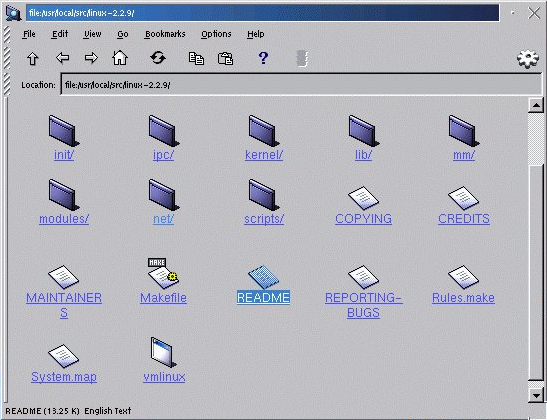
While it's obvious that KDE has come a long way since KDE 1.x, it is still easy to see which parts of KFM have inspired Konqueror's contemporary design, which was introduced as part of KDE 2.0. KParts technology revolutionized the way we used our File Manager application, turning Konqueror into a full fledged web-browser, and more. Here's a shot of Konqueror from KDE 3.5.6, and you can see that while the user interface is much improved, the same basic concepts remain visible from the KFM days.

Konqueror really shines as a beacon of KDE technologies in the KDE 2.x and 3.x series, showcasing the best parts of KDE technologies. Konqueror showcased the power of KDE's IO slaves, allowing true network transparency when managing your files over FTP, fish (SSH), HTTP, and much more. Konqueror is so advanced that you can enter an FTP URL into a HTML upload form and it just works as you would logically expect it to (as far as I know, it is the only browser which allows this). It also featured KParts, which allowed it to embed just about any sort of viewer required, directly into the interface, embedding things like KPDF, KWord, image viewers, and most importantly, the ever-improving KHTML page renderer. This is important, since even Konqueror's icon views were implemented as pluggable parts, making just about any kind of icon view possible.
So, Konqueror is a really powerful tool that can do just about everything you and your system can possibly want, and with this power comes unlimited configurability and extensibility through control modules and plugins. However, what often happens in Konqueror when you are browsing the internet is that Konqueror still wants to behave as a file manager and not a web browser. This split behavior is easily noticed through elements such as toolbar buttons. For example: the "Up" arrow is still available on the toolbar even when browsing Google Maps, but it is totally irrelevant in this context; another is having a web bookmarks toolbar visible while sorting icons in your /home folder.
Introducing Dolphin: Dolphin is a new File Manager for KDE 4 which is dedicated 100% to file management, and is not intended to be a one-size-fits-all tool as Konqueror currently attempts. It is intended to optimize your file management related tasks, and present an easy to use file manager for casual KDE use. That doesn't mean it won't be powerful or configurable, only that Dolphin is being built for a single purpose.
Dolphin isn't a total rewrite however, and is not intended to compete with Konqueror, rather the two applications will be complimentary. Dolphin uses the already existing IO slave facilities of the KDE platform to perform remote or local file management, meaning that it will be capable of doing all of the 'remote management' type activities that Konqueror has already matured. Dolphin just won't show web pages or PDF files embedded as Konqueror does.
And Konqueror will benefit from Dolphin as well. Konqueror is not going to disappear for KDE 4, although its user interface may yet see some adjustments as its primary utility will not as the default file manager. Of course, Konqueror will still be available for file management tasks as it has been in the past - there will be no changes in this regard. Changes made to KDE's icon view parts through the development of Dolphin will also help to improve Konqueror's icon views, as they both share these libraries. As stated before, Konqueror loads all of these icon views as pluggable libraries called KParts - improvements to the underlying KParts automatically benefit all users.
So lets take a look at Dolphin and Konqueror as they currently exist in KDE's Subversion repository. Please keep in mind that these snapshots represent developer work-in-progress builds and, while publicly available, are not representative of the final appearance or intended functionality of either applications, nor are they recommended for everyday use.
Konqueror currently looks something like this, and the icon views only half work. The problem is that these file views are simply direct ports of the KDE 3 codebase. Konqueror will eventually receive the same fileviews that Dolphin is currently using.

You can tell from Konqueror's default configuration of using tabs, and various other related interface choices that Konqueror is now mostly a web browser that also happens to do file management. While Konqueror's roots are truly derive from file management, it is more frequently operated as a browser these days by many KDE users. Konqueror does a great job as a web browser, underpinned by the fact it now implements CSS 3, including the highly-anticipated 'opacity' tags.
So while Konqueror continues to improve as a browser, it will continue to maintain KDE 3.x file management standards, providing a baseline functionality, and will be improved as code is shared between itself and Dolphin.
Dolphin is a whole different animal. It is a 'real' file manager - it's interface has a lot of elements which are specific to a file manager and cannot really be justified in a browser. This is best demonstrated with a screenshot.
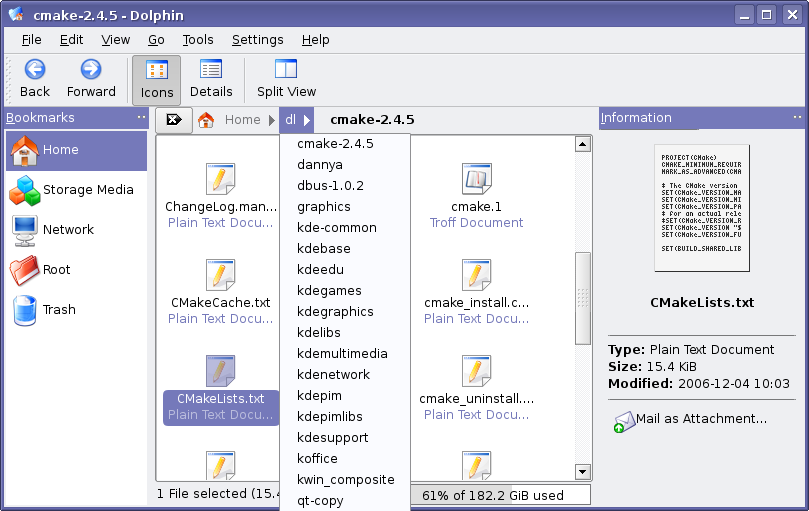
Notice the implemention of a 'breadcrumb'-style directory selector, which works well for file management in a lot of cases, but is totally useless if you need to enter a URL when using a browser, and so becomes the sort of widget which is only useful when dealing with file hierarchies. Breadcrumb widgets may be familiar to anyone who has used OS X's Finder or GNOME's Nautilus. Another comment about the above screenshot: clicking and holding a breadcrumb item displays a list of directories that are at the same level as the one clicked, allowing for more efficient navigation.
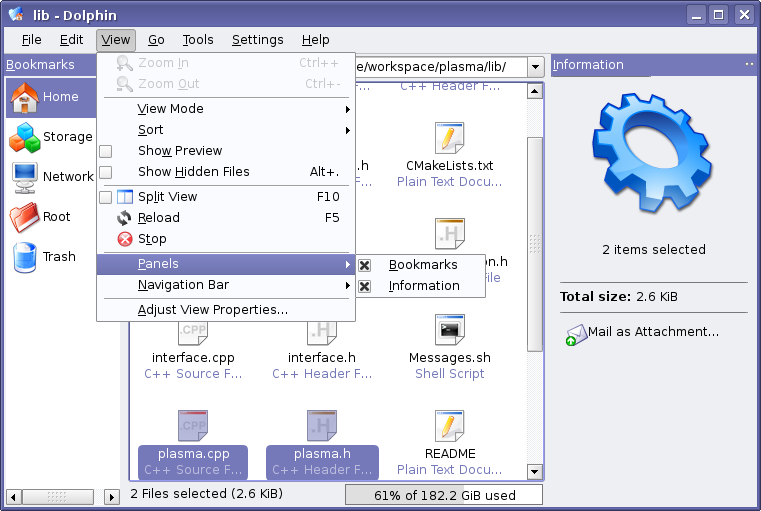
However, using the breadcrumb widget is not essential, and if you are more comfortable with a Konqueror-style location bar, this mode of operation is easily configurable, as seen above. In fact, much of Dolphin is configurable, illustrated below.

This screenshot evidences the amount of effort KDE is spending trying to make configuration layouts sane while still providing as many options as reason allows. Also note the improved appearance of the configuration dialogs in KDE 4. Of course, this is going to be revisited somewhat as the dialog is too tall for some screens at the moment. After the Oxygen visual components go live, this dialog will be even easier on the eyes.
So, Dolphin's functionality is not entirely new, other than it presents itself in a new way. It can be seen as a hybrid between the power of Konqueror and the structure of Nautilus. Dolphin still builds on a strong KDE base, reusing existing technologies like KIO slaves and so forth. Right-click actions that were available in Konqueror will still be mostly present (except that Dolphin will necessarily load files externally instead of using embedding viewers). And Konqueror can now improve its web browsing experience even more, doing so without losing the file browsing support that has been there since KDE 2.0.
When KDE 4 is released, Dolphin will be configured as the default application for the local file:/ protocol, as well as the default file manager listed in the applications menu. Konqueror will ship as the default web browser, and will still be usable as a file manager to those that prefer the historical lifestyle. Users of KDE will have the ability to set the default file browser, much like how KDE 3.x can use third-party applications such as Krusader as the default file manager. Stay tuned for more information as Dolphin and KDE evolve towards 4.0.
Comments
"That doesn't mean it won't be powerful or configurable, only that Dolphin is being built for a single purpose."
I think this bears repeating - something that is optimised for File Management and which can implement features without worrying how they will affect other functionality (e.g. as Troy mentioned, the "breadcrumbs" mode would not be a good fit for Konqueror as the mode is not useful for webbrowsing) could *easily* end up being a far more powerful and configurable tool than Konqueror, while avoiding the cascade of clutter when you open a config menu by virtue of its not being a Swiss-army knife. The factoring out of useful code from Konqueror into shared libraries means that if Dolphin doesn't have this as its this goal, then writing a File Manager that does will not be such a Herculean task
It would be interesting to see if anyone steps up and makes a dedicated Khtml-based, KDE-integrated web-browser.
> It would be interesting to see if anyone steps up and makes a dedicated Khtml-based, KDE-integrated web-browser.
There's already, called Konqueror.
I think Anon's emphasis was on "dedicated". Although in that sense it's still a weird thing...
This could be an interesting idea. What I feel may be more useful and this may already be the direction used is kind of like a shell that detects what type of activity you are performing. Yes, Konq. already attempts to do this but let's take this into the near-do-al ways of Microsoft for a minute. If you have Windows Explorer open and attempt to navigate to a website by manually entering this into the location bar, just about everything from Windows Explorer (Exception, File Tree on left) will disappear and be replaced by the layout of Internet Explorer. Surely, with the fact that Konquorer already attempts to determine what the user is doing, this cannot be to difficult to do - just switch seamlessly switch from Konqueror to Dolphin and mid-shift.
Please, no flaming on this as this does seem to be the idea asked here and may already be a direction we're headed.
Actually with IE7 installed, Explorer no longer switches layouts like that. It now just opens up the default web browser with that url. Note it uses the default web browser, not just IE7.
"as Troy mentioned, the "breadcrumbs" mode would not be a good fit for Konqueror as the mode is not useful for webbrowsing"
It would be very easy to implement it so that Konqueror switches to using a breadcrumb interface when in filebrowsing mode. I hope this switch to Dolphin development doesn't mean the filesystem side of Konqueror is left as is. I don't see why anything currently implemented in dolphin couldn't be included in Konqueror's fileview mode.
I'd say that breadcrumbs aren't a good fit for file browsing either. The only place where breadcrumbs (sort of) work are in blogs -- and even there it's only useful because there isn't anything better, really.
Any reason why you don't think they're a good fit for file browsing? The advantages are that you have one click access to to any ancestor directories AND (by holding down the button, moving your mouse a bit, and then releasing) access to direct descendents of directories in the ancestor directories.
I can't see any real disadvantages.
Well, maybe you're not looking for them really.
I see one clear disadvantage, and it is that with the "breadwhatever" you totally lose the sense of where you're standing inside the directory tree. There's no single way in this paradigm to eyeball what other places are there in the directory structure to find what you're looking for (an image, text, whatever).
Let me say that I really dislike that paradigm and from my experience is something that is not by any means more usable than the tree structure, let alone that you're trying to change what 95% people already feel comfortable with as Richard stated.
If I was to ask something to Dolphin's developers as not to make this breadchunks the default way of looking at the file structure. Make them an option for people wanting to 'think different'. ;)
> If I was to ask something to Dolphin's developers as not to make this breadchunks
> the default way of looking at the file structure. Make them an option for people
> wanting to 'think different'. ;)
Please, guys. Try dolphin before complaining about it. This is already an option.
And since yesterday dolphin in svn also has a treeview. It's not finished, but it is there. Added within 24h(!!) after all this complaining started.
Fist of all, I can't try Dolphin, because I use Mandriva 2006 and don't have the chance to do it.
But I would like you to read more carefully before replying.
I said what I said, not because I believed there won't be a tree view in Dolphin, but because, as I understand, currently the breadcrumbs seem to be the default option and I clearly don't like that fact.
I hope I have made it clear this time.
How are breadcrumbs in the location bar worse than text in the location bar? With a single click the breadcrumbs will switch to the standard location bar as well. Also there is a KDE3 version of Dolphin which should work in Mandriva 2006 no problem.
I don't mind having breadcrumbs in the location bar if I can have a tree view at the left side of the Dolphin window, but by all means I don't want to have it as a replacement for the tree view. This would be a step backwards.
I for one like and use the Up button on websites that are well structured, like the dot.
And allowing websites to provide a tree-structure would be good too. Better than learning navigation over and over.
Kay
So do I :)
..I sec.. third that! Moving up is one useful, the Google Toolbar has it also! But it got kinda broke by not being able anymore to move up from a subdomain. I filed a bug 2 1/2 years ago but it got ignored: http://bugs.kde.org/show_bug.cgi?id=95433
I wished I could code QT so I could fix stuff like this myself... after the exams I'll try...
Who else thinks that keyboard navigation is a very important topic where Konqueror (and Dolphin 0.x) have deficits?
Just navigating between directories, deleting files (focus jumps to the beginning of the directory), creating folders (new folder is *not* selected),... today has too many (usability) bugs.
This could be a great way for you to contribute to the KDE project! Not many people bother with keyboard navigation, so I guess is gets very little testing. Once eveything stabilizes a bit more why don't you download a snapshot and give dolphin some thorougher keyboard only testing and submit bugs? I'm sure it would be pretty easy to do and would make sure Dolphin is perfect for you in KDE 4.0!
I agree, there are way to many keyboard related bugs in kde, probably half of the 30some bugs i have reported to kde have been keyboard navigation related.
E.g. hit alt+b (bookmarks menu), hit down until you have selected a folder, hit right and then left and finally the menu key (between alt gr and ctrl), then choose anything there, e.g. properties, notice how the dialog you get isn't the correct one, you are getting the dialog for the topmost item in the folder, not the folder itself.
i think that all [not object oriented] actions should be available through keyboard.
for example i've hidden kmail toolbar after learning all keys i need. (and i rarely use menubar as well)
another example: i execute apps by pressng Alt+F2, typing first few chars of the name and pressing enter (autocompletion can be enabled in the rmb-menu of any lineedit)
and of course amarok global shortcuts rule
I use the up arrow when I'm browsing to get to the upper directory of the html file I'm viewing. For example this news addres is http://dot.kde.org/1172721427 , so when I press UP, Konqueror will open http://dot.kde.org/ . I like it !
The bookmark are store as KIO://address and I also like it!
Agree. The "UP" arrow is one of the nicer things about konqueror.
Yeah, +1 saving the up arrow in Konq.
I didn't say it's going away either :) I was just using it as an example of a button that is less than intuitive for many websites. What does it do when using gmail? it breaks the website (last I checked). Works great on dot.kde.org though... I use it after I post a comment to go back to the article quickly :)
The back button breaks a lot of sites too. But that is caused by (ab)using the browser as an application platform rather than a hypertext viewer, so the back button is not really to blame. (I like web apps, but they are definitely something web browsers were not designed for.)
I find the up arrow very useful: if you come in via a search you often find yourself somewhere deep down in the tree structure of a site and on many sites navigation controls are either missing or not obvious, making the up arrow a quicker alternative.
+1 for up button
Me too,
The up arrow is a great feature for web browsing, something I immediately miss when using firefox.
Yes it does have limitations, but it's very useful to getting to a site's toplevel page after landing deep inside it having followed a websearch result.
Firefox has a plugin called konqefox or similar, based on the knonqueror functionality. Some other plugins also provide this. And check out the buttons in FFox 2!
Konqueror definately lead the way with this button, and I consider browsers without it to be broken, especially when you consider the social bookmarking sites that link to deep structures, and you want to have a nosey round the site :)
Please check again, up-button works fine in gmail, it brings you to your overall view of your mailbox. In my personal experience there are very few websites that really break with the up-button.
Mark me down for the "up" arrow (and the "clear" / "enter" clickable buttons by the url, they save a boat-load of time for me...)
Ditto that. I like it too. I only wish it would skip cgi parts. But I can live with that.
Troy, thanks for the terrific articles. And especially to all the kde4 developers!
I recently had a chance to use MacOSX, after being 99.9% KDE and 0.1% Windows for several years. Given OSX's reputation I was excited to give it a spin, but I confess that I really did not like the Finder. One of the biggest usability problems for me: it took me 10 minutes to figure out how to go "up" one level of the directory hierarchy. For me, the problem was that it looked like all the functionality should be available from the buttons in the finder window (so much of it was), but in fact one had to navigate into a menu in order to find "up". Even now that I know what to do, it still seems like a really horrible usability design mistake.
Now, perhaps the breadcrumbs (which look nice!) basically eliminate the need for an up button? But will an up button be available as an option? (In particular, do recent versions of Windows still have an up button? One could imagine this being something set by an initial "configure KDE to look like: 1. KDE, 2. MacOSX, 3. Windows" wizard.)
Also, what will the breadcrumbs code do when the file hierarchy gets so deep that it can't all be displayed in the window? Presumably there has already been thought given to this, but I'll offer my 2 cents (for what it's worth):
1. Having all of the breadcrumbs get more and more abbreviated (sort of like the tabs in konsole) might not be great, because then they really won't convey any useful information---a single character probably won't help most users figure out which directory is which.
2. One might want to prefer showing the directories that are immediately above the current location, if necessary at the expense of ones even higher up. After all, one can always click "home" to get there.
3. Alternatively, the algorithmist in me likes a "fully display every nth directory" (or perhaps choose the ones to display on a log scale, oooo!) because it insures that any higher directory is not many clicks away. But I fear that could be rather confusing to most users, so I don't really suggest it seriously...
> But will an up button be available as an option?
In the KDE 3.5 Dolphin release, you can add an Up button by configuring the toolbar.
I would prefer your option 2 combined with Left/Right buttons similarly to the Left/Right buttons that appear when you have too much open tabs in Konqueror.
Speaking of tabs in Konqueror, I would like to have an option for setting the minimal width of the tab title (if you have many open tabs, the title currently reduces to "..." which is not very informative).
As a basic KDE user guy, I'm crazy about the 'Up' arrow when using the browser. It's one of the things I miss every time I am forced to use Firefox. Keep it handy, please.
Cool! I was missing the Up arrow while using Dolphin and I just realized that it can be easily added by right clicking on the toolbar and clicking "Configure Toolbars". KDE rocks. :)
Just another +1 for "keep the up-button as part of the default buttons". I think this button is really useful when browsing websites. It would be a shame that handy buttons are removed in the "quest for an empty toolbar". Who makes these decisions?
Forgot to mention that gmail works just fine with the up-button, it takes you to the beginning of your mailbox.
+1 for the Up button.
This thread just tells the writer of this article how ignorent he is.
How about to KPart Dolphin and Konqueror just to embed it when viewing files just as KPDF is embedded for viewing pdf? This part could also be used by the "Open" dialogs.
Well, the icon view from dolphin is being made into a KPart for just this purpose, although it's probably too heavy for a file dialog :)
But you're on the right track. Dolphin, Konqueror and kfile (the File|Open dialog) share code already.
Any and all usability improvements made to the listing of directories should appear in all three. But obviously, kfile will be a lot more limited in features than Dolphin: it is not a file manager.
> it now implements CSS 3, including the highly-anticipated 'opacity' tags.
Not everything remotely related to web development is a "tag" you know. You are referring to the opacity *property*.
Yeah, and they aren't called "tags" either; they're called "elements" according to XML and DOM.
Tags exist, and so do elements, but they are not the same. For example:
Hello there
This is one element, and two tags (a start tag, and an end tag).
Not even that was correct ;)
Hello there
Is actually two elements, and two tags. The tags are [, ] and the elements are [the b-tags, the text]. Text inside a start- and end-tag is an element by itself. A "text element".
My apologies :) thing semantics over syntax, I'm not a professional writer or anything :P
Also, it's not strictly correct to say Konq implements CSS3, as many modules of CSS3 aren't even complete yet. The linked article refers to the CSS3 Selectors module plus one other propere
Also, it's not strictly correct to say Konq implements CSS3, as many modules of CSS3 aren't even complete yet. The linked article refers to the CSS3 Selectors module plus one other property
Use whatever you want, but I don't think switching to "Dolphin" as the default file manager for KDE will be a good thing. One of the biggest complaints I see from Gnome (and even some OSX/WinXP) users is that their file managers are not as capable as Konqueror. If it really bothered people so much that Konqueror also did file management; then why not the wholesale conversion to Krusader? or Nautilus? or the other 8 dozen file managers? Because Konqueror is easily the best file manager available on any platform... The users haven't wanted a switch from Konqueror. In fact the only users I hear complain about Konqueror currently is users who have no intention of EVER user it, because it is a KDE app.
Remember when Gnome switch to the "new" filemanager design in v2.0? Most users assumed that the limited feature set meant that it was somehow broken. I really don't want users to come to KDE and think it's file manager is broken.
The other question I have is; if it is SO important to move away from Konqueror as the default file manager, then why not simply use Krusader? It is already there, it is fast, it is actively developed, and it has a signle focus.
Bobby