Again, after a delay brought on by a bout Real Life (tm), we return to bring you updates on the state of Konsole, KDE's UNIX terminal program. Konsole has been a staple of KDE since KDE 1.0, as has been showing signs of a little bit of clutter and wear. So, Robert Knight has stepped in to clean up the program's code, and more than anything else, fix a cluttered and difficult interface. Read on for the details.
The goal of Konsole itself is pretty simple: provide a window to run a command prompt and command-line applications from. In fact, it has evolved from the very simple 'kvt' terminal program in the pre-KDE 1.0 days. An older KDE 1.x version of Konsole is pictured below:
Image courtesy of a (very old) book about Linux at linuxbook.orbdesigns.com licensed under the (also very old) Open Content License v1.
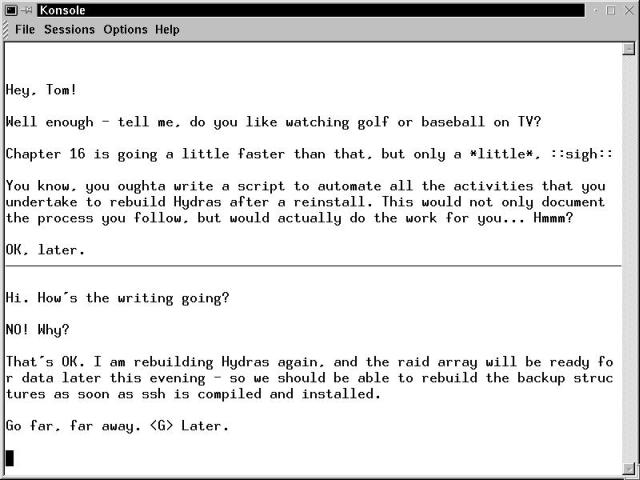
The version of Konsole from that era was very simple, but it wouldn't stay that way, as more and more features were added. Konsole users wanted transparency (shiny!), support for more text encoding schemes, ways to control every feature possible: Konsole ballooned into a monster. By KDE 3.x, it can best described as a highly-functional mess.
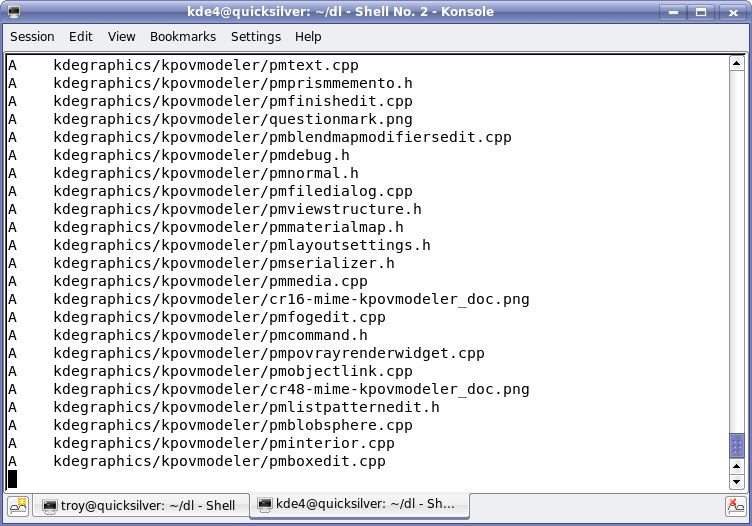
As an example of just how bad Konsole had become for KDE 3.x, I present the following screenshots, the first showing a normal Konsole window from KDE 3.5.6:
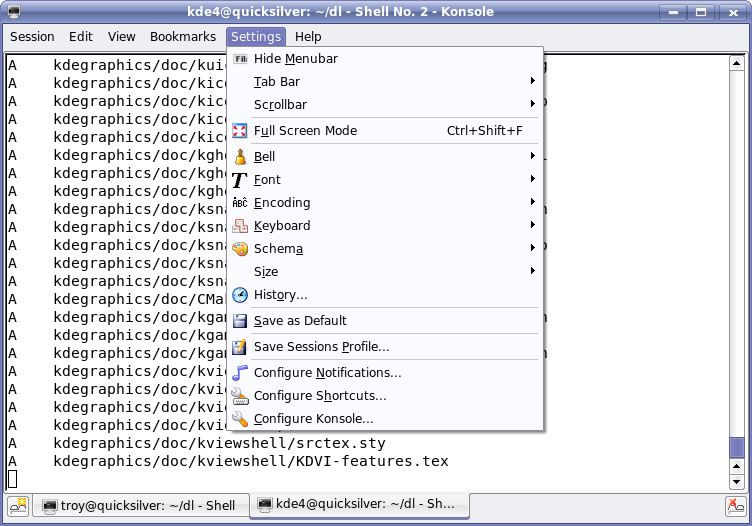
Possibly the worst settings menu of any KDE application in KDE 3.5.6 follows:
And if that isn't enough, actually going to the settings dialog makes the situation even worse.
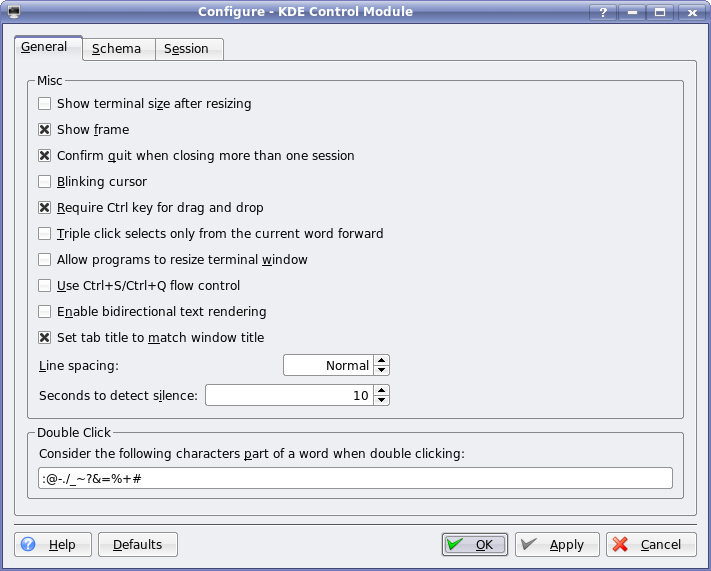
If this isn't the most user-friendly theme dialog you've ever seen, then demand a refund. (I joke! It's actually terrible for many reasons, but the seemingly random nature of it is probably the best reason to dislike it).
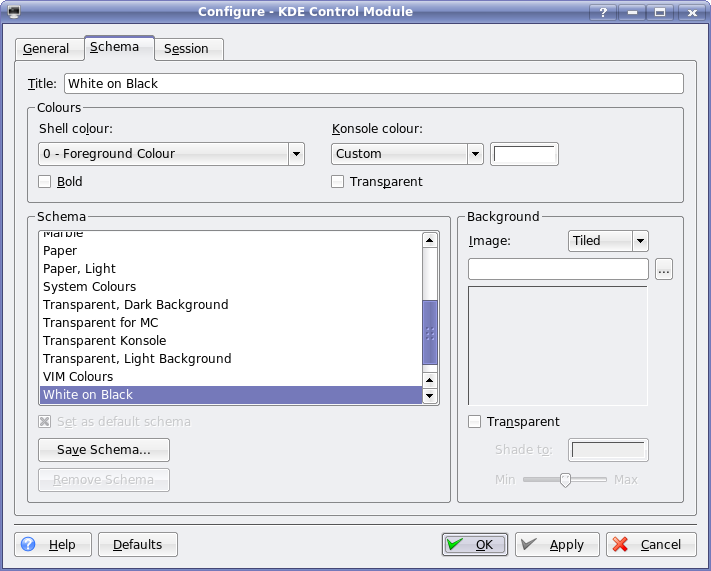
The worst offenders are the settings menus, as you can see. An overly complex settings menu leads itself to an ugly settings dialog.
When the KDE 4 development series commenced, Robert Knight took over maintainership of Konsole. He decided that he would focus on bug reports and feature requests filed via the KDE Bugtracker, bugs.kde.org. Ever aware of the fact that users can be pretty picky about what features an application like Konsole needs to have, he created a few online surveys to help with the determination of the most common as well as fringe use cases. This feedback has driven much of the work.
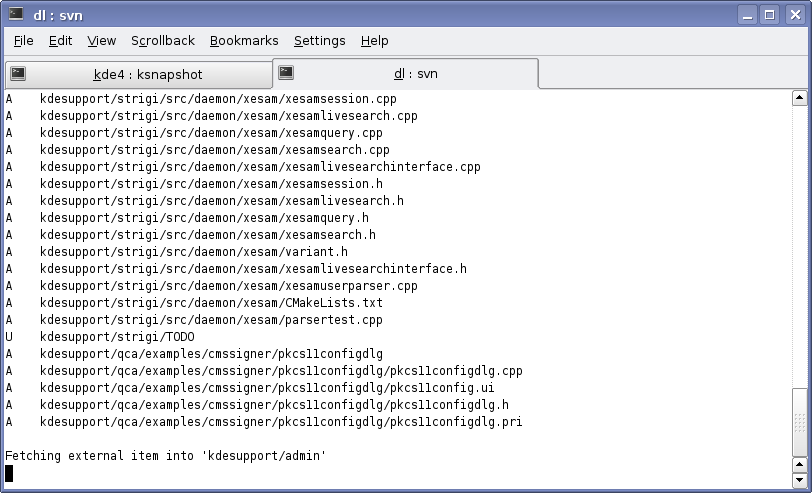
The end result is a Konsole for KDE 4 that is visually very similar, functionally improved and with a settings system you can actually stomach. The screenshot below shows that the main window has not changed too much. The tabs are shown at the top in this screenshot, however Robert tells me that they have been defaulted to the bottom of the window as this article went to press. Additionally, you'll notice that the text on the tabs contains more helpful information. This is configurable is a friendly manner - see three shots down.
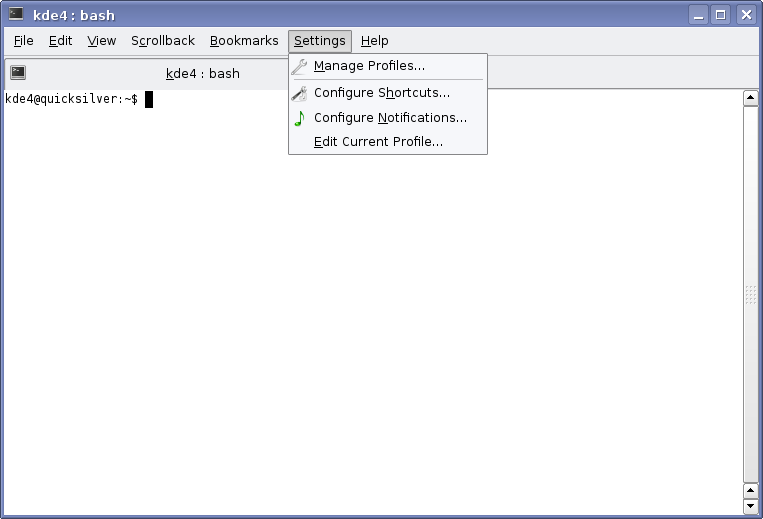
The once-intimidating settings menu now becomes very simple. It may look like the configuration options are gone, but they are still all available in a sanely organized fashion.
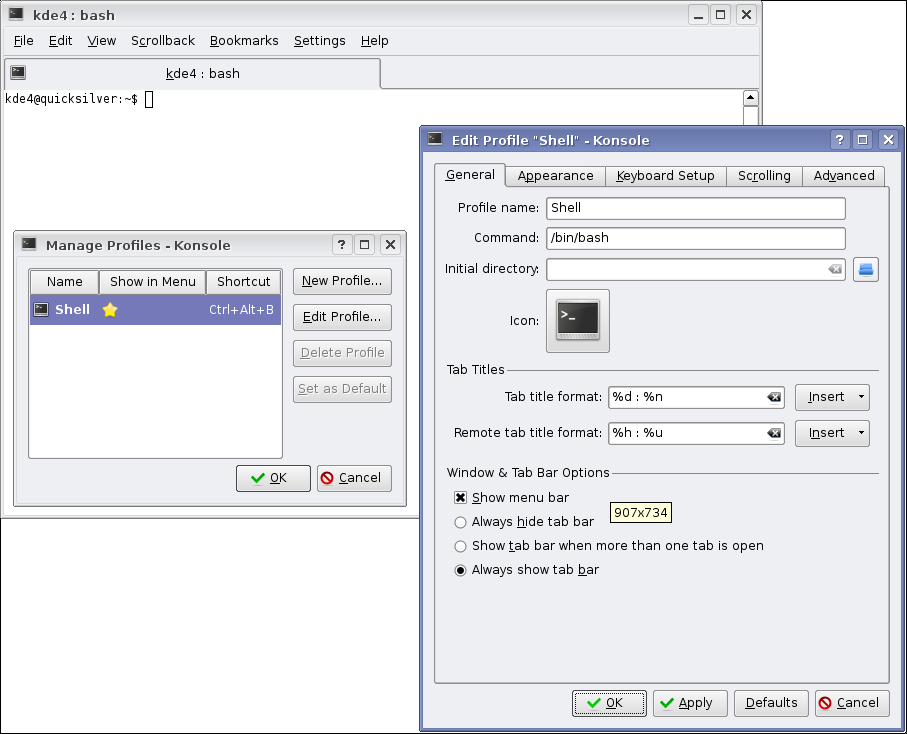
As you see below, the settings menu leads to a Profile selector, under which all the settings are kept separated. They are much more organized now, rather than an odd collection of random check boxes.
And lastly, the appearance people will appreciate this dialog: its implementation is effective and its use becomes obvious. Additionally, Robert has implemented style previews in an intuitive manner. As you mouse over the style, the Konsole window in the background automatically applies that style in an active preview. So you can very rapidly look through and appreciate the styles just by hovering over the list.
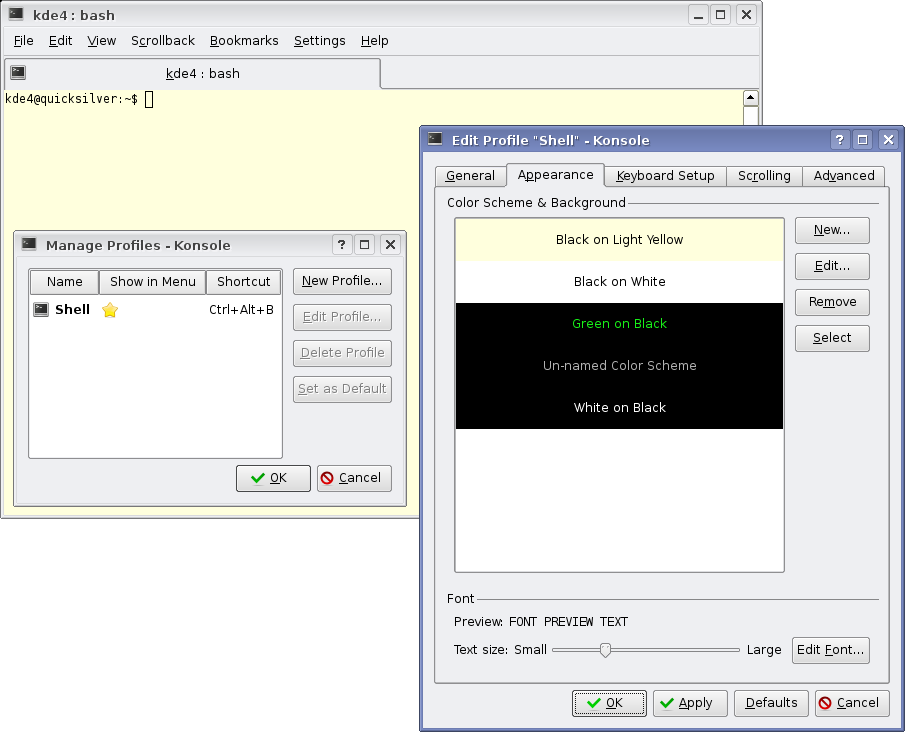
Side-by-side comparisons aside, Konsole also offers a number of other improvements. Among them, split-view mode, faster scrolling (thanks to a smarter line redrawing scheme), hotkeys and more.
Much of the inspiration for these improvements comes from analysing other programs. For example, the split-view mode, pictured below, is inspired by GNU Screen. It is a console output cloning tool so that you can see two views of the same scroll buffer. For example, if you are a developer, and you need to compile something really big (like say, KDE), then you can read through the scroll at your own pace on one side, while still monitor the output progress simultaneously. This is not a multi-panel model like Konqueror, so much as it is a cloning mode that lets you see more than one thing at a time within the same buffer. In this shot, the two sides are displaying the same output, just scrolled to different points.
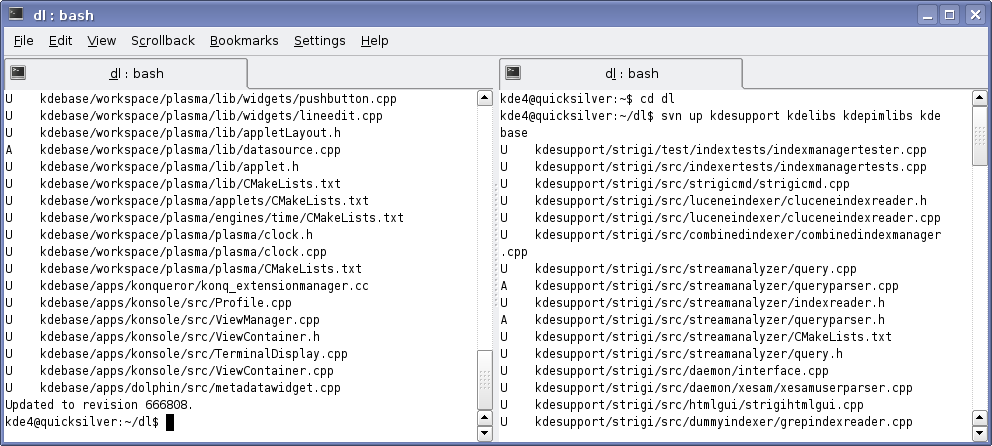
There is friendly interaction between Konsole and some of its biggest users. In particular, Yakuake just recently implemented a Split View mode like the one listed above. When I asked Eike Hein about the relationship between the two projects, he said "I think Yakuake is beneficial to Konsole in KDE 4 in so much as Yakuake is a more demanding user of the Konsole KPart than most applications, so developing Yakuake has resulted in finding out a few things about how the KPart's interface can be improved :)"
Konsole has benefited from a few features that were requested by the Yakuake users. For example, there is a new hotkey that pops the terminal up and down quickly. This was in response to requests from the Yakuake users when Robert did his interface survey. Of course, like all things KDE, it is configurable. With Robert at the helm, it is even more user-friendly to configure it.
Future plans for Konsole include, among other things, ideas such as: tear off tabs, a commandline configuration interface, and making tea. I asked Robert if it would one day make coffee, but he's British and much prefers it to make tea it seems. Perhaps when it obtains beverage-making abilities, this argument will resurface once again. :)
On a side note, this is the first time I have attempted to write my article from within KDE 4 itself. While a few applications were not stable enough to use, including Kicker (which is dying anyway), the experience was good enough that I will probably do the same henceforth. Now that the libraries have mostly settled down (with a few exceptions), the changes are becoming more apparent in the applications. I'll be keeping an eye out for more things to feature in this series, but the next topic should be the KWin window manager, barring any major problems. Cheers.
Comments
I was so going to write a flame about the placement of the tabs after looking at those screenshots, but I am much happier now that I've read the full article.
Nice work again, Troy, thanks! :)
I was so happy to see the tabs to be moved by default to a sensible position, but after reading the full article I have to write a flame. Why is KDE keeping this utterly nonsense setting as a default? Almost every other app (including Konq!) have the tabs on top, and users have come to expect the tabs being on top. Having them below the thing they are switching is confusing to a new user of the application.
Well, one reason for doing so could be Fitt's Law, which has things to say (amongst other things) about why pixels closer to the screen's edge are easier to hit with the mouse. Since Konsole has no status bar, the bottom edge of the window lacks anything to click, and as such it might as well be used for switching between views. This is just me hypothesising, of course, i have not spoken with anyone about it.
I do not know where the tabs should be. But on the bottom, it makes sense for terminals. In a terminal, most of the time, you are working right at the bottom, since this is where you type new commands and where the commands outputs arise.
The tabs are located where your eyes are monitoring. :-)
+1, right on spot.
I use Konsole a lot, and everything that happens is at the bottom of it: the last line you type in the terminal, and switching tabs. I seldom use the menu, and everything which is located at the top of the terminal window is stuff I typed some time ago (ie: my history), which I also seldom want to access.
So by having the tabs at the bottom, all the action in a terminal is happening in the bottom part of the window, and the rarely used stuff is "stored" in the top part of the window.
In Konqueror, the tabs are in the top part because the stuff you do with it involve: using the menu (more often than in a terminal), typing something in the adress bar, clicking on an icon in your toolbar, or a link in your bookmarks toolbar, which are all elements located at the top of the window. So this is where the tabs should go as well.
Wackou.
Even though my eyes might be on the bottom, my mouse is on top of the window, where it mostly is. I am used to go to the top to scroll tabs, like in Konqueror, so I prefer it the same in Konsole. But hey, it's configurable, I don't really care for the default in this case as I think neither one is really worse.
you use a mouse for changing tabs?
I just set konsole to use ctrl-, and ctrl-. like all my other tabbed programs.
btw, konsole has default shortcuts shift+cursor keys to cycle through tabs (and shift+ctrl+cursor keys to move them).
handy.
I totally agree with you on this one! It absolutely makes sence to have it at the bottom(for me at least), your eyes will be there when you're working and so it's easier to switch them.
Good reason. Aesthetically I like them on the bottom to balance out the menu. Having both at the top leaves the window looking top heavy, with the bottom looking somehow bare. Of course, all the action happening at the bottom is a better reason ;)
Note that by this logic, tabs should be also at the bottom for web browsers: usually you change tab when you're finished reading a webpage..
Bah, it doesn't really matter as it's easy to change..
> Having them below the thing they are switching is confusing
> to a new user of the application.
Most of the time when working in the terminal, your eyes are at the bottom of the screen reading the most recent output. It therefore makes sense to place the tabs there as well so that it isn't necessary to shift your gaze up and down the screen continually. The same logic applies to Kopete where new messages appear at the bottom of the window.
A web page however is different since the most interesting content, which means new articles, news, product information etc. appears at the top of the screen. Power users will have their bookmarks there as well. In that case it makes sense to put the tabs at the top, as Konqueror/Firefox/Internet Explorer do.
I can understand why it might seem conceptually better to have every application's tabs work the same way, but it doesn't take into account differences in how users work with those applications.
Agreed, coherency is *good*.
It depends
I think Konsole is a thing where you have your eyes usually on the last lines of the output and the very last line very you enter your command (Unlike a Web-Browser, etc..). So basically having the tabs near that area makes sense to me and i like it that way.
Totally agree.
Man, all this talk about *where* the tabs are is good for one thing...
proving that the ability to change settings is a good thing. I use the keys to navigate through tabs as well but if I don't like where they are located, I just *change* their position. I mean the author *did* spend a lot of time asking us where to put them *and* how the settings and configuration screens should work!
I say "STOP CRYING AND USE THE TOOLS KONSOLE GIVES YOU... PUT THEM WHERE YOU LIKE"!
It looks just awesome! :)
Really looking forward for the first Beta release.
Bye.
Once again, great job Troy!
Could you please fix the first and third screenshot? The first one says "The requested URL /dannya/vol14_1x_konsole.png was not found on this server." when clicked, and the third one links to the second one (vol14_356_konsole.png).
I did the survey even if I'm not an active Konsole user - I prefer more 'lightweighted' terminals (I do use Yakuake for irssi though). But it's always fun when you can make your voice heard and help supporting KDE.
I have to say that the improvements look very nice, specially the new interface. This was not mentioned (I think) in the article, but true transparency is something I look forward to see (Yakuake + true transparency = love)
True transparency for 4.0 has been coded, however it is currently disabled by default as it breaks on machines that do not have proper composite support. This seems to be an issue encountered by quite a number of programs, with each program having to independently implement tests for composite support. Perhaps something should get factored into a library so that this problem goes away.
About the broken links - Danny will probably have to fix them as I do not have editor access to dot content. I'm just submitting my articles using the contribute link on the side.
Found the reason for one of the broken links: it needs a .jpg extension instead of dot .png. Still not certain of the other one.
> with each program having to independently implement tests
> for composite support
bool KWindowSystem::compositingActive();
so that excuse is gone =)
Could you communicate this directly to Troy in case he doesn't read these comments again? [/irony for using the comments to make this request]
Fortunately I do read these comments, and if Robert hasn't already made the change by the time I'm home from the uni, then I'll do it myself :)
Cheers
KDE 3 + compiz = Yakuake + true transparency ;).
You can have it right here right now! (I also love the effect, especially cool with a video window in the background :)) Would love to see the compiz coolness reimplemented in a compositing version of KWin :).
You have your wish. This is already implemented in KWin for KDE 4. I have an article in progress on this topic.
Mistake: in the title blurb, it should read KDE 1.0, not 2.0. I have it correct in the body. This should probably be corrected before other sites start to pick up the header. My fault, sorry.
Please, could you check and fix the links (on the images). Some are not working (404) and some leads to the wrong pictures :( .
Well, at last something interesting for real
users in KDE4 instead of useless eyecandy :P
Thanks Robert :)
So... Solid, Phonon, Akonadi and Nepomuk are now classed as eyecandy, and even the useless sort... *giggles* i must say i find this an intriguing concept ;)
And just to clarify the importance of these to your "real users": All of these make it considerably simpler and more consistent to handle hardware, multimedia, PIM and data respectively. So, it is all stuff that works behind the scenes, but that does not mean it's not good for "real users".
I am waiting to see some USEFUL eyecandy being implemented, for the benefit of real users :P. Per-window settable transparency, compizey Alt+Tab switcher, and MacOS-Expose-alike feature - those are things I would like to see in compositing KWin!
Your wish is, uhm... well, not my command... But it seems Lubos' ;) http://www.kdedevelopers.org/node/2787
... is already available in KDE 3.5.6, and has been for several microversions at least. Admittedly, the UI could be made rather more intuitive, but it works, at least for those using a good composite-active xorg and xorg graphics driver.
1. Make sure your xorg graphics driver has composite support and that you have composite turned on in your xorg.conf.
2. In the kcontrol Window behavior applet, on the Translucency tab, activate the Use translucency and shadows checkbox and OK thru the warning if you get one. On the Opacity sub-tab, set your system-wide translucency default levels for the various window types (Active, Inactive, Moving, Dock, and the "keep above" as active checkbox). OK out and restart KDE if necessary (from my experience, it appears if it starts with translucency enabled you can turn it on and off as desired, but if it starts off, you have to restart KDE to turn it on).
That activates it in general. To change specific types of windows (window classes) from the defaults:
3. In the Window specific settings applet (reachable from the control panel, the setting menu, or the the window menu for a specific window), create a new config for your specific window type as necessary. Then on the Preferences tab, set the Active and Inactive opacity as desired. (There's no window class default for moving windows, that's a system-wide default only, AFAIK.)
That sets the general defaults for specific classes/categories of windows, and/or specific apps, depending on how strictly you set the matching for the specific window settings. For individual windows:
4. In the window menu for each window, there's an Opacity option. If you want a specific window set to something other than the system or window class defaults, set this. Since this is for a specific window, unlike the general system-wide and window class defaults, it applies only as long as the window exists. It also appears to apply to the /active/ state only, since the window is by definition activated (at least with the settings I have here) when you activate its menu, so it's the active window settings that apply and are adjusted. Unfortunately, I know of no way to set inactive window transparency for a specific window, only at the system and window class levels. Still, the window class settings are likely to suffice in most cases.
BTW, there are still occasional bugs where KWin apparently gets mixed up and forgets to set a specific window to its usual state. I most often see this when a window says at "inactive" transparency even after it has been activated. Opening the window menu and clicking on the button under Opacity returns it to the usual defaults, thus fixing the transparency issue for that window temporarily. I don't have to do this often, but it does happen occasionally.
So yes, there's definitely per-window transparency available in current KDE, with active/moving/inactive defaults configurable at the system level, active/inactive defaults for specific window classes configurable as exceptions, and individual active window settings configurable as exceptions to the class or system defaults.
FWIW, I'm using an ATI Radeon 9200, as it's one of the last cards ATI actually cooperated with the X community on, releasing specs and even sponsoring some open development. Naturally, I'm running the native freedomware xorg driver, with exa rendering (MUCH more CPU efficient than xaa), and yes, it supports composite quite well. =8^)
It's getting a bit dated now, but I've a screenshot of my dual monitor desktop, taken back when I was running KDE 3.5.1 and xorg 7.0, with composite and transparency enabled. (You can see in the screenshot how much CPU it was chewing, far left sysguard graph, 100%. Things are far better now, with it generally using ~10% of a single CPU, same Opteron 242s.)
http://members.cox.net/pu61ic.1inux.dunc4n/pix/screenshots/index.html
Yeah, I know about all this. The problem is, I want to simply change the transparency at will, without going thorugh 10 dialogs... In compiz (default config) you simply move the cursor over the window, and use Alt-Mousewheel...
In Kwin for KDE 4, if you right click on the titlebar, there is an opacity option in the menu that lets you quickly select some of the more common values very rapidly. Alt+Mousewheel makes sense though, since the window manager already captures most ALT+MouseKey type actions for resize, move, etc...
> compizey Alt+Tab switcher, and MacOS-Expose-alike feature
This isn't useful, but eyecandy.
I think Exposé is one of those eyecandy things that can also be classified as rather useful ;)
You obviously didn't use them, otherwise you would know how wrong you are :). Both make finding the right window you want to switch to MUCH faster. Suppose you have four Konsoles open, one of them make'ing some app. Suppose you want to Alt-Tab switch to it. What is faster, finding the item with the right text on the list, or simply choosing that item which has constantly scrolling output in the live thumbnail? :)
I know it's in there now, but it's "fake" transparency. It just shows the background, no matter what. It also repaints a bit slow when moving the konsole window.
See
http://dot.kde.org/1179921215/1179939880/1179940099/
Real transparency is available in Konsole for KDE 4.0, it will require a desktop which supports transparency ( eg. Compiz or KDE 4's KWin ). Currently disabled until I fix some problems on desktops which don't support it.
KDE 3's fake transparency and image backgrounds are not included.
Additionally proper transparency is available in KDE 3.5.7 via a command-line argument ( --real-tranparency ) when starting Konsole, though that again causes glitches if enabled on desktops that don't support transparency.
> KDE 3's fake transparency and image backgrounds are not included.
Does this mean I can't use my favorite paper background ?
I wonder if it would be possible to implement (an optional) support for commandline use of kioslaves before implementing the tea feature?
In the sense that there would be on option: "Turn on transparent kio-slave interpretation" (or something) and then on the command line one could type something like "cat http://www.kde.org/" and konsole would use http-kioslave to retrieve the file and then feed it to bash (or whatever) as cat's parameter...
Oh well, down to submit a bug report :-)
kioexec cat http://www.kde.org
It'll even offer to upload back to the server if you modify the file. (works with fish, sftp, ftp, webdav, etc.)
How about integration by konsole sniffing for addresses from shell prompt and redirecting them transparenntly to kioexec?
After all, konsole is the layer between user and the shell... ;-)
how should this handle "wget http:\\dot.kde.org" ?
http://kde.ground.cz/tiki-index.php?page=KIO+Fuse+Gateway
However, why is this still in kdenonbeta? Why isn't it in, for example, extragear?
Hmm, doesn't work properly:
fuse_kio /home/user/test fish://user@fishsomewhere
fuse_kio: fuse_opt.c:67: fuse_opt_insert_arg: Assertion `pos <= args->argc' failed.
Will everything still be configurable in the popup menu when the menu bar is hidden? I find it useful.
I don't think it is a good idea to put Encoding setting in some configuration dialog. I use it frequently and it is also in the menu in Kate and katepart based applications.
It's still there, under the View menu I believe. It's been reorganized to be sane as well. :)