KWin, KDE's window manager, has been around since KDE 2.0 (replacing KWM in KDE 1.x) and has grown to be a mature and stable window manager over the years. For KDE 4, however, there were a few people rumbling about visual effects, and perhaps KWin was feeling a little envious of its younger cousins Compiz and Beryl. While these new effects have created a lot of buzz around Linux and UNIX, long-term KDE users have wished they can enjoy the effects of Compiz/Beryl while still having the tried and tested window manager that is KWin. As a result, for KDE 4, KWin has received a huge graphical upgrade, with composite and GL support. Read on for more details.
KWin has implemented effects in a way that allows a number of different rendering methods to be used, depending on your specific combination of hardware and drivers. These features have brought KWin rapidly into the era of dazzling eyecandy, along with some pleasant surprises on the usability front. This effort has been spearheaded by Lubos Lunak (a man known for his efficient code) and his team, with special mention to Rivo Laks and Philip Falkner for their contributions.
Effects are disabled by default at the moment, although that may change before KDE 4 ships, and distributions may decide to alter this setting anyway. When enabled, the effects are designed to degrade gracefully. If GL is not available, KWin disables GL effects but still allows Composite effects where possible via XRender. If XRender is not available, it falls back to plain X, running in the same fashion as the present KDE 3 version. To get the full array of effects, you need to have a video card (and driver) that supports AIGLX, XGL or use the proprietary Nvidia driver.
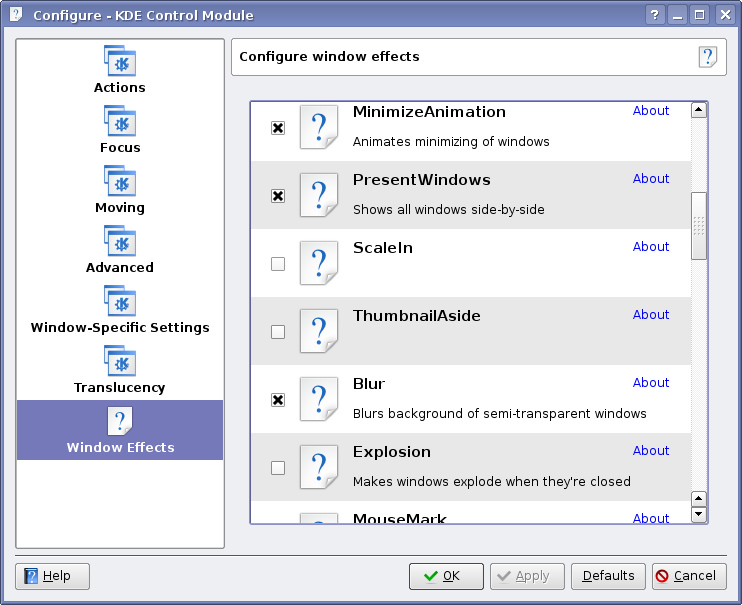
Once the effects are enabled, it's simply a matter of choosing which effects you'd like to activate. So far, Rivo Laks has been working on the effects plugin selection interface (see the screenshot below). The new plugin selection widget shown is making its way into various parts of KDE - it does automatic dependency checking, so once the dependency tree is known, it will intelligently enable or disable dependent plugins. This widget is also showing up in other parts of KDE 4.
(as you can see in the image, this dialog is quite new - less than a week old - and is missing all the icons...)
Lubos has been periodically blogging about the effects that KWin is now capable of, and has recorded a number of videos showing them off. Since video capture on my system is rather chunky, I will present his recordings instead. So, without further ado, I present some of the more popular of his flash videos, hosted by YouTube. If you are interested in more, please visit his YouTube User Page
The Present Windows Effect - a very useful effect that falls into both eye-candy and usability categories...
The Desktop Grid Effect - those familar with the Cube effect may note that this is not quite as flashy, but probably more useful. Doesn't mean there cannot be a Cube effect for KWin though.
This one shows the above two effects, as well as the Alt-Tab thumbnails, but it shows that the effects work great, even when the windows contain active videos.
Zoom Effect and Magnifier Effect: some accessibility related features that everyone may find useful, depending on your specific needs.
Effects like this one make people go "Wow". The first part of this video features the Fall Apart Effect, which basically has a window blow up. It's amazing how well this effect can be demonstrated in a low quality flash video...
Aside from Lubos, many of the new effects and underlying core components were programmed by Rivo Laks and Philip Falkner. They are responsible for many of the effects you see in the videos, including the Present Windows Effect, and the improved Alt-Tab dialog. There have been a number of contributions from others as well, and they are always looking for new and interesting ideas. In addition, KWin for KDE 4 builds on the already existing KWin version which has had dozens of people contribute to it over the years.
The window decoration shown above is called 'kwin3_crystal' and is still set as the default in SVN. It is simply a port of the existing KDE 3 Crystal window decorations, however, a new KWin window decoration is still in the works for KDE 4 - it hasn't been made the default yet, so I haven't been featuring it. When it does eventually become the default, you'll be sure to hear about it here (and likely in Danny's KDE Commit-Digest as well...).
KWin for KDE 3.x implemented a very simple composite manager, allowing simple effects such as window transparencies, fading menus, shadows, and so forth. The code was not too complex, but the infrastructure was not in place to seriously extend the effects to GL powered goodness. When the KDE 4 development series opened, it was seen as an excellent time to rewrite some of KWin's internal structures in order to support such effects. There were initial considerations of implementing support for the existing Compiz and/or Beryl system of effects via plugins, but there were technological hurdles that prevented this. I won't go into the technical details as to why this decision was made, however, it is important to note that KDE 4 will still work with Compiz/Beryl should the users choose to use that software instead of KWin.
Additionally, while KDE 4 will be supporting a number of platforms with libraries and applications, KWin is one of the applications that will not be making the switch as it is inextricably tied to X. This should be considered to be a Good Thing(tm), as it ensures that KDE will always be the best looking when used with Linux/UNIX, and hopefully it (and related KDE Workspace technologies, like Plasma) will remain a unique benefit of using a more open operating system.
KWin promises to ensure that KDE get the graphical boost it needs to keep the eye-candy folks happy, while providing new and usable features for the desktop environment that would not have otherwise been possible. Yet, it maintains the rock-solid foundation that a long history as an integral part of KDE has provided. It will still work (with reduced levels of effects) on any system that KDE 3 ran on, so no-one is left out in the cold. It is already the default for KDE 4 in SVN, and will be showing up in future beta releases.
On a personal note, I've found that KWin on my system was dropping down into XRender mode due to some X settings I need to fix, but it has been perfectly stable for me over the last two weeks. In fact, every week when I'm rebuilding KDE 4 to write these articles, I am more amazed at how quickly it is becoming stable and useful. If you are interested in testing it out for yourself, check to see if your distribution has packages available. I am aware of the existence of at least one live CD (where you don't have to risk messing with your system) that is available at the KDE Four Live website. They update the Live CD every few weeks, and currently has the KDE 4.0 Alpha 1 packages. Additionally, if you are brave enough to test the Composite features, and are having problems, have a quick look at the Composite HowTo.. If you have problems, please report bugs using the the KDE Bug Tracker by selecting the KWin program, and the "composite" component.
Until next time.
Comments
Ok, it's nice to see, how much kwin have grown on the optical side, and there are very usefull things, but, is this all? IIRC there were plans to implement features like the window-handling as seen in ratpoisen(?), ION and wmii, or tabbed windows like fluxbox have them. Also, there were talks about some layer-things, but i don't remeber if this were for kwin or for plasma.
KDE has had "tabbed windows" since the B-II window decoration was created in KDE 2.0. It's one of those nifty features that no one used, so it never really evolved from there. I still think it's kind of neat...
There are other things happening in KWin, it's just not the focus of this article. I have several months of weekly articles still to write before 4.0 comes out, so I need to leave myself some material :)
BII has nothing to do, with tabbed windows. It's also really ugly, and seems a bit buggy. The advantage of tabs, is the possibility to group windows, but BII does'nt do this, it handle all windows the same, and waste space.
Well, that depends on how you define tabs. It has window titles that auto-arrange themselves like the tabs on top of folders, assuming they are lined up to be the same size. Tabs are still just a metaphor for the folder tabs you find in the common filing cabinet, and BII's titlebar arrangement fits this requirement. That said, BII is in a pretty bad state of affairs these days...
I don't think it's really in bad shape. There are a few things that may be improved, but the only real problem I find in it is when the composite extension is enabled. I just noticed this when trying composite on my new laptop, since composite has never really worked on the desktop PC.
The problem is that BII is the only KWin decoration that can change window shape dynamically, and with composite enabled, the title bar is badly clipped when the window title changes, or it is moved around with shift-click.
Composite also prevents the titlebar unhide code to work.
I'll have to find a fix for those problems, but it's not been high priority for me, and I'd have to find out more about how composite works.
B-II is great, I use it on each of my computers since KDE 2.0 and I hope it will still be there (hopefully improved) in KDE4!
Not tabbed as in graphical widgets, but tabbed as in functional capabilities with semantic grouping, tagging and scripting. KDE 3.x works well with ion3, by the way, and ion3 provides much of what I wanted that the 3.x series KWin couldn't provide... and I pretty much maxed out the capabilities in terms of scripting and settings for KWin 3.x.
Personally, I don't really think KDE's default Window Manager really needs to have such advanced capabilities. KDE should just to make sure that the apps work well within the X standards so that they work with alternate window managers that do support such capabilities. After all, dcop and ion3's lua scripting is a heck of a powerful combo I'd hate to give up in KDE4 (other than a transition to dbus).
Correct me if I'm wrong, but Konqueor is tabbed. I can view any part of Kcontrol (via "settings:/") in one tab, a text file in another, a video in another, a website in another, any part of my filesystem in another,fish://.. in another (and then some) simultaneously.
Uhm, we're talking about window management, not browsers, here.
> and there are very usefull things, but, is this all?
Yes, it opens a whole new world of options!
for people with disabilities:
- dim inactive windows
- zoom windows
- apply a negative effect over the whole desktop in real-time.
for usability:
- The real-time Alt+Tab / taskbar thumbnails make it easier to find windows.
- The desktop grid / beryl cube make it much easier to grasp the concept of virtual desktops.
- Subtle shadows and gray-out make windows easier to distinguish (like what's in front)
- The shadows and window open/close effects make it easier for new computer users to grasp the concept of windows in general.
And for speed improvements:
- Windows no longer need to be redrawn when you move them over other windows.
- The desktop takes advantage of your - otherwise idle - graphics card hardware, lowering CPU requirements.
Did I miss anything? :-)
> Did I miss anything? :-)
Yes, features for advanced users :->
> Yes, features for advanced users :->
Arguably KWin already has a lot of those.
Having some, do'nt mean, having enough.
There is a wide world of windowmanaging waiting :)
For an interesting wrap up of the KWin Composite work, check out this video by Rivo Laks:
http://www.youtube.com/watch?v=4WBLlc6xCQ4
It is 6 minutes long, and covers configuration, setting up the composite effects, and some more effects in action.
Hey sweet! thanks for posting this one Troy. ;) It's pretty valuable for those that don't read planetkde.org on a regular basis...
Good work everyone on kwin. However, what is the difference between using kwin and using beryl with the aquamarine decorations (this uses the kwin decorations)? I just don't understand why it is better to work on kwin directly rather than build on beryl with aquamarine.
KWin is a full-fledged WM, well integrated in KDE, with a long histroy and strong codebase; while Beryl/Compiz is it not.
Well, it's not just about decorations, but features that are built into the window manager. Little things, like mouse focus modes, switching virtual desktops, snapping windows the screen edges, these sorts of things. While many of these features will be in beryl now, they have been in KWin for a decade, and just about every fringe use case has been programmed for. You should try running X without a window manager once just to see how much work a window manager actually does for you.
the answer is quite straight forward:
- kwin works everywhere (degrades gracefully on less capable hardware), beryl doesn't
- kwin is a production ready *window* *manager*, which means it has all sorts of window management oddities fixed; take a look at the handling of transients in the code to see just how crazy this is. how lubos maintains his sanity i'll never know ;)
- kwin has various kde integration features and we can continue to maintain that easily
- it is easier to add what beryl has on top of the above than it is to add the above to beryl
- we all share the benefits of what is going into the shared infrastructure (x.org) so it's not all lost efforts
and if you care .. s,beryl,compiz,g
I'm using Beryl for quite some time now and it works so flawlessly with KDE that it just seems like a duplication of efforts to implement all those effects again in KWin. Everything in Beryl just seems to work. What are those "fringe-cases"? Why is it I never experienced those? Just out of interest: Could you or some other expert give an example of one end-user-understandable thing that wouldnt work right now in Beryl and couldnt be easily implemented? What are "transients"? Please don't get my wrong. I'm not trolling here but I'm really interested in technical behind-the-scenes info on what makes KWin so special so maybe I can appreciate it more in the future ;-)
> Why is it I never experienced those?
they are called "fringe" for a reason. a production window manager that is relied on as heavily as kwin is needs to be solid in all cases. these include all sorts of things such as the handling of certain types of java windows, apps that try to self-manage their windows, etc.
> What are "transients"?
windows that only exist in conjunction with another window; e.g. a warning dialog associated with a main window.
you also seemed to have skipped over the "works on all hardware" bit.
Your arguments are convincing me, Aaron.
I'm glad to see this feature additions now happening in KDE's own window manager. That's for sure the most logical thing to happen.
But imagine for a moment that something "bad" had happened to Lubos in the last 6 months (the infamous "bus case"... or that he got fed up with KDE4 coding... or $whatever): who would then have taken over kwin maintainership (*and* kept his sanity)??
And would Lubos have felt so much incentive and/or inspiration to defend his kwin territory's supremacy if there would not have been the challengers of compiz+beryl?? :-)
So, to me, it looks like it was not bad at all to have seen that crazyness of the "competing" window managers' speedy feature additions happening in the last year or so (and see them being able to work with KDE3 just fine), and experience a serious "migration" of the more playful and adventurous-minded section in our user base over to the camp the competition (using a non-KDE window manager to run their KDE desktops).
Beryl+compiz certainly didn't hinder kwin's development, and provided a lot of examples (to follow as well as to avoid). So hats off to them!
Some examples of how KWin is better integrated with KDE than Beryl are:
* the KDE Desktop Pager doesn't work with Beryl (at least it didn't originally - there's a patch available now I think). The "single desktop 4x as wide" paradigm threw it off.
* KWin has a DCOP interface, allowing other KDE programs to communicate with KWin in a standard way. KWin 4 will probably use DBus (DCOP's successor) now that the rest of the Linux world has caught on, but DCOP was around for years before DBus.
* I personally experienced a lot of problems with Beryl+KDE. The window decorations would disappear for no reason, windows wouldn't get focus events properly (I would have to hit F12 *twice* to bring the Yakuake console to the front), etc. So maybe Beryl worked perfectly for you, but you were one of the lucky ones. I wasn't, so I'll enjoy Kwin.
> * KWin has a DCOP interface, allowing other KDE programs to communicate with
> KWin in a standard way
Hm, I checked KWin's interface with kdcop, but only found some neat things for configure the desktop and opacity. So, is this really all, or is there somewhere a switch to expose a mighty interface for poweruser and their scripts?
To use kwin with dcop, just call dcop on an window, not on kwin...
What?
I can't call dcop a window. I can only use the interfaces, exposed by the applications, and there is nowhere an advanced window-managing interface to found.
As far as I know you can't address an arbitrary window. However all kde applications have a dcop module (or whatever that's called) that corresponds to their window.
For instance if I type dcop konsole-4414 konsole-mainwindow\#1 (4414 being my konsole pid atm)
I get a list of 135 functions, like setSize, focus, maximize, raise, etc etc.
Exactly. But not every application is a kde-application. And in fact, there are also kde-application which does'nt offers this interface, ktorrent oder dialogs for example.
So, a complete scriptable interface, for every window, would be nice. I know, there exist wmctrl, but this prog has limits.
your problem with yakuake not showing up immediately is probably because you first start kwin, and then replace it with beryl at the time yakuake is already up. i had the same problem and i solved it by writing a file ~/.kde/env/use_beryl in which i wrote the single line KDEWM=/usr/bin/beryl . (and remove beryl from autostart after that manually!) startkde will source that file and will read that variable to start beryl instead of kwin. that solved all the windows-are-not-working-for-me problems i had before.
but, nevertheless, i also think it is right to extend kwin instead of using beryl, which still has alot of problems. :)
> I'm using Beryl for quite some time now and it works so flawlessly
> with KDE that it just seems like a duplication of efforts to implement
> all those effects again in KWin. Everything in Beryl just seems to work.
> What are those "fringe-cases"?
What's broken in 0.1:
- focus stealing prevention
- OpenOffice dialogs
- starting windows as minimized (e.g. for chat clients)
- re-focusing existing windows from the application itself.
- good positioning like kwin does.
- handling modal dialogs on top properly with focus events.
- displaying modal dialogs in the alt+tab bar.
shall we continue..? :-)
I actually get bug reports for things in my application which are caused by Beryl.. :-|
And don't forget all java apps! Beryl simply show a grey window with no widget/text in it.
Try export AWT_TOOLKIT=MToolkit to solve this "grey-windows" problem under Beryl/Compiz :)
I don't know about what makes KWin better, but Beryl still has a lot of problems. I have been unable to getting is working on my system no matter what driver I use. Having the interface build in as part of KDE without extra setup would be nice.
Chad
http://linuxappfinder.com
And may I add that Aquamarine is just a Beryl window decoration that allows you to use KWin window decorations and nothing more. It doesn't magically make Beryl behave more like KWin. It just makes Beryl *look* like KWin.
I guess the greatest loss for me when using Beryl is the lack of integration with KDE. That's a very big loss considering that one of the reasons I use KDE is the integration. Hopefully, KWin 4 will give me that bling I want without sacrificing the features I need.
Kudos to Seli and company! Great job!
First of all, KWin is MUCH more advanced. Not on the visual side, but instead it has all those little things that go unnoticed while making the work more pleasant and fast. Clever auto-arranging of windows is only one of those underestimated features. The second reason would be that Compiz/Beryl architecture is a mess. Those WMs were a trip into an uncharted territory, and as such they could not benefit from existing experience in writing compositing managers. The effect is a messy codebase that either way should be rewritten. So if a complete rewrite is needed, why not stick with the good and mature KWin codebase, and extend it to embrace new possibilities given by compositing?
You could just as easily say why did the beryl developers create aquamarine when they could have added the same features to KWin. I do believe KWin was first. See how that works? :)
Since everyone is accomplishing the same thing, the functionality will eventually be delegated to a shared library that everyone uses, i.e. KWin, Aquamarine, compiz etc will all link against the same lib3DDesktop.so or whatever. I'm not saying it will happen but it could and probably will sometime in the future just for practical reasons.
It would happen if it was possible. But, as Troy mentioned, this was discussed - using beryl and compiz stuff. Sadly, Beryl and Compiz don't really have a proper plugin system, they just expose all of their internals to the so-called plugins. It's bad security-wise, compatibility-wise etc - and makes it impossible to share plugins.
I believe you superstoned but maybe there can be made one exception. "Compiz: Screenlets!" are really great, it would be good if Kwin-composite could use screenlets from compiz :D
Then, if it's true that KDE4 could use dashbords from Mac, with additional compiz-screenlets KDE4 would rock!
KDE can't use mac's dashboard applets. This is a rumour, and we don't know where it started...
"This is a rumour, and we don't know where it started..."
http://www.kdedevelopers.org/node/1715
It started from Zack Rusin:
http://arstechnica.com/news.ars/post/20060102-5881.html
http://www.kdedevelopers.org/node/1715
Interesting that his quote is such that he 'intends' to develop a compatibility layer, not that one exists. *sigh*
That's the way of rumors. On the other side is kde4 a large series of promises, much broken, more realized. So, until it's finished or another message regarding this appears, the people believe in the promise. No one knows what is coming, until it's finished.
very nice! Would like to have this on my ATI Mobility Fire GL T2/T2e as well.
Will ATI's proprietary fglrx driver be supported in the near future?
Ask ATI.
AFAIK their drivers don't support compositing.
But KWin will just fall back to plain X when used with fglrx. Not that much eyecandy, but it will work;)
AMD has claimed that they will be releasing ATI drivers as opensource - so I assume that once this happens, it will be supported in short order... I'm pretty certain this works under the opensource driver already, but there may be some speed problems.
I guess as long as AIGLX or XGL work with the fglrx drivers, you should be okay. The reason I mention the nvidia driver directly in the article is that for nvidia, it works without aiglx or xgl, which may or may not be an advantage, depending on your perspective... (one less layer means slightly faster, vs. proprietary driver implementing things in it's own way....)
If I'm not totally incorrect, NVidia has implemented something very similar to AIGLX on their own.
ATI's proprietary drivers (fglrx) doesn't even support composite yet. But once they (hopefully) release their source code, the extensions will be added quickly to the drivers/it will be merged with the radeon driver.
Also noteworthy, is that I read somewhere that ATi was blocking the release of open source drivers that supported their newest card (the code was ready, but somehow the programmer wasn't allowed to release it, probably an NDA).
About NVidia: that is correct to the best of my knowledge.
Also, about fglrx, last I checked, it does support Composite, and it does support GL, but not both at the same time forcing you to choose. Normally, users will elect for GL, since you are reduced to using Mesa if you enable Composite.
Not sure about the ATI rumour, but when companies release the source code, they usually try to clean it up somewhat to ensure they aren't accidentally releasing IP that they do not own the rights to... think of the big delays in opensourcing java, for example, or star office :) A driver is a little smaller, but the principle is the same.
Troy Unrau, you say NVIDIA's drivers work without XGL or AIGLX. I know XGL is a separate X server, but isn't AIGLX a part of X.org?
http://en.wikipedia.org/wiki/Aiglx
"The AIGLX project has been merged into X.Org and is available as of X.Org 7.1."
http://en.wikipedia.org/wiki/Xgl
"Xgl is an X server architecture..."
So how can you work without AIGLX if you run X.org and use NVIDIA drivers?
NVidia's drivers perform the same functions as AIGLX or XGL without their presence. They do it internally within the driver, and as such, will run KWin Composite on X.Org version 6.9, for example, when using the proprietary nvidia drivers.