Just because KDE has been designed to be portable across Linux,
FreeBSD and other UNIX/X11 environments for an age now, doesn't
mean we aren't up for the occasional challenge. With version 4, Trolltech released Qt for the
Mac, Windows and now even embedded environments under the GPL.
Since Qt is the base upon which KDE is developed, KDE is now free to
offer native support for these platforms. Today I am focusing on the KDE/Mac developments for KDE 4. Read on for the details.
Before I begin, I'd like to discuss some branding issues that KDE has had to face in previous releases. With KDE 3, does the term "KDE" refer to the Desktop Environment (KWin, Kicker, kdesktop, etc.) and if so, would it still be reasonable to refer to the Mac OS X port as "KDE" even if it was without these key desktop components? Or, is "KDE" a reference to the project as a whole, in which case we can still call Konqueror a "KDE application" whether it is running on Mac, Windows, or in Enlightenment...
These are some branding issues that have been discussed for KDE 4. The resulting decision has been to refer to "KDE" as the umbrella that refers to all things KDE. So, as a result, we have KDE Applications, the KDE Development Environment (libraries and technologies), and the KDE Workspace (this consists of KWin, Plasma, etc.) that refer to the three main components that make up the collection of KDE software. When referring to just "KDE" by itself, you therefore refer to all things KDE.
This also solves some issues with alternate release schedules for some applications. For example, Amarok has often released on a different schedule from KDE, and so some people have not considered it as part of KDE proper. Amarok for KDE 4 will be more clearly labelled as a "KDE Application" without the related implications of it being restricted to a given desktop environment. In KDE 4, Amarok is a KDE product, even if it is based on its own release cycle. As Amarok lead developer Mark Kretschmann says, "If Amarok convinces more people to use KDE technologies, that's perfect. If they use Amarok under other desktop environments like GNOME or Mac OS X, that's still nice for us."
Since this article deals with KDE on other platforms than X11, we need a way to distinguish between KDE for X11 and KDE for Mac. So, with the approval of some of the developers, I'm going to use the following terminology: KDE/X11 will refer to all KDE Applications that run on X11, the Development Environment on X11, and the KDE Workspace on X11. Likewise, KDE/Mac will refer to KDE applications that run on the Mac, the KDE Development Environment on the Mac, and since the workspace is not required on the Mac, it is not included here. Ditto for Windows. It is important to realize, however, that these distinctions are based on a subset of features that are available on each platform, and that for the most part the source code is identical, and there are not separate source trees for each platform. There are no forks or haphazard ports.
New KDE Development Environment technologies like Phonon and Solid will help ease this transition, since the platform-integration work will happen at the library level. KDE Applications need not be aware of the differences that might exist in the OS platform.
What is KDE/Mac?
KDE/Mac is the collection of KDE Applications that run natively on the Mac, including the underlying technologies, libraries, etc. that make these KDE Applications work. There are only a few differences between KDE/X11 and KDE/Mac. Most notably, the KDE Workspace elements, such as KWin and Plasma are not present for the Mac. The reason for this is that the functionality of KWin and Plasma already exist in OS X in one form or another, and reimplementing them would not allow for close integration of KDE Applications alongside existing Mac Applications. So instead, KDE has elected to not port the KDE/X11 Workspace to the Mac.
Since the beginning of KDE, its applications have been designed in such a way as to peacefully co-exist in other UNIX Desktop environments. Initially this meant Window Maker, and then later GNOME and Enlightenment. The KDE Applications use shared standards (such as those crafted at FreeDesktop.org), capable of sharing clipboard data, system tray icons, and so on without any issues on these compliant platforms. Now, because of the additional portability that Qt 4 offers, this same peaceful co-existence will also be true for non-X11 environments, such as the Mac.
KDE apps have been able to run on the Mac before, using Apple's X11 server layer that is built into OS X - however, KDE was still using Qt/X11 and as such, these applications simply looked identical to how they would look in good old KDE/X11 proper. The fact that they ran at all is thanks to the excellent efforts of the Fink project. If you're interested in running other UNIX programs on OS X, check this project out.
(For a time there was also a Qt/Mac Freeware edition which allowed some experimentation with a true KDE/Mac experience within the KDE 3.x series. However, The KDE/X11 version in Fink was usually used due to its stability.)
Here's a screenshot of a KDE application as it looked using KDE 3.5 and the Fink project's packages. Click for the full version.
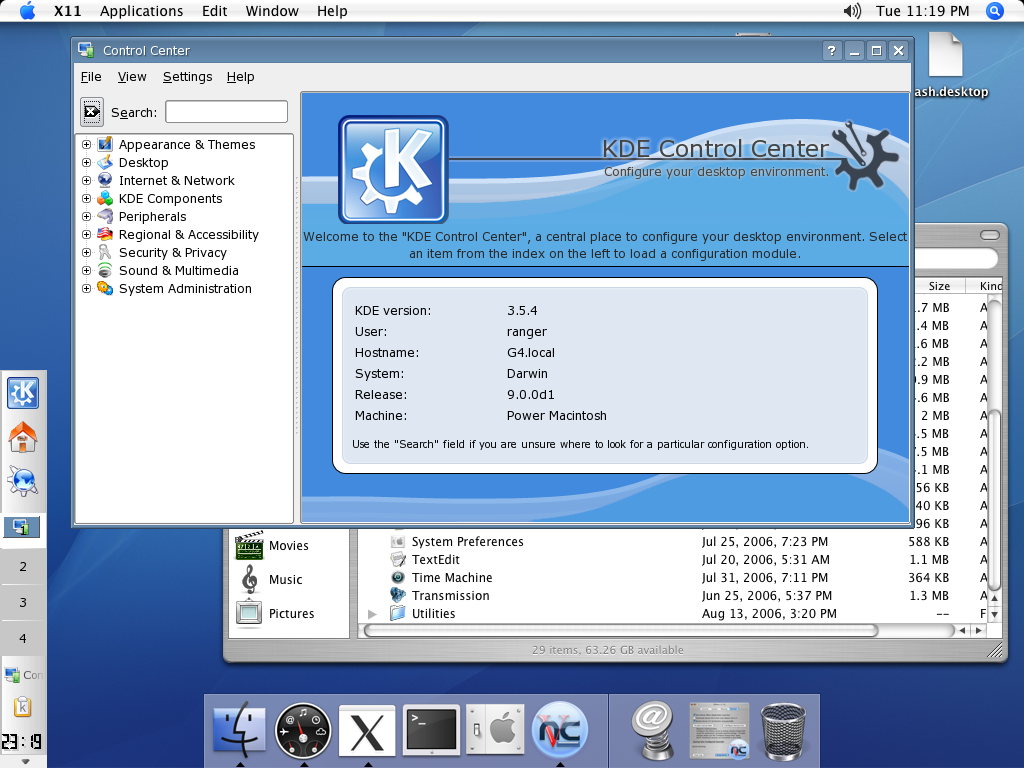
Because the above was developed for Qt/X11, the whole KDE environment was able to run. The downside, however, was that it did not integrate well with the Mac, so it felt like you were running two totally different computer systems on one screen. Of course, KDE is all about the integration...
KDE 4 brings great advances to the Mac porting effort, thanks mostly due to Qt 4, and the new KDE build system, based on CMake. For KDE 4, the KDE/Mac applications are downloadable as standard issue, Mac .dmg files, available from the KDE on Mac OS X website. The KDE/Mac development snapshots are among the easiest to use for any platform, thanks mostly due to the great work done by KDE/Mac guru Benjamin Reed (a.k.a. RangerRick). Visit #kde-darwin on irc.freenode.org to help report and fix anything you see that is broken. This is pre-alpha KDE 4, so it's likely to crash until more development has taken place.
Once the downloaded packages are unpacked and installed, KDE/Mac applications can be launched using OS X's Finder as shown here:
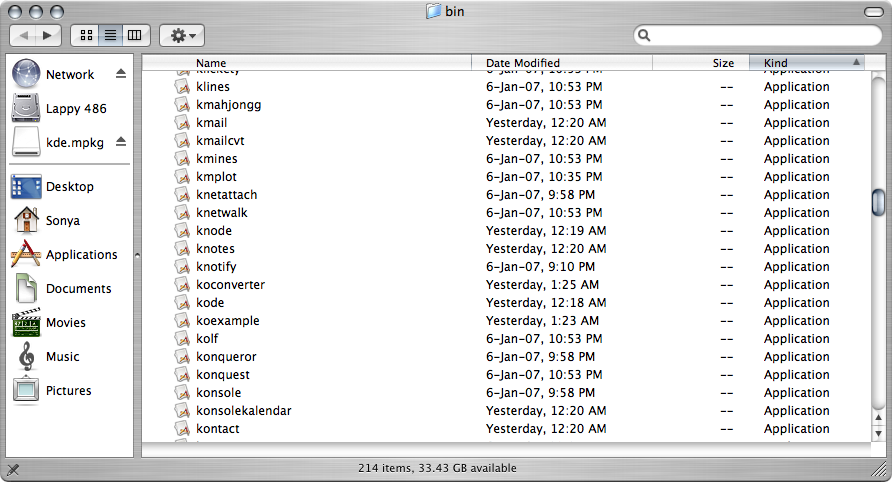
As you can see, quite a wide variety of applications are already available for the Mac, including most of the official KDE applications. Because this is a development version, some things are still broken (like any apps using SSL) and some things are just plain ugly. But the same is also true of many KDE 4 apps on KDE/X11 at this point, so expect both offerings to improve throughout the KDE 4 development timeframe.
At the same time, some very important things have occurred in KDE/Mac integration. For example, the clipboard works. Keyboard shortcuts work. Extended language input works. Some things, like drag-and-drop remain sketchy. The KDE/Mac developers would welcome any fresh talent that knows a little about KDE and Mac technologies to help solve smaller issues like this.
Here's what you've been waiting for: the screenshot tour of a few KDE 4 apps that are working on the Mac to show off some of the progress so far. Some of these apps will surely be greatly appreciated by Mac users.
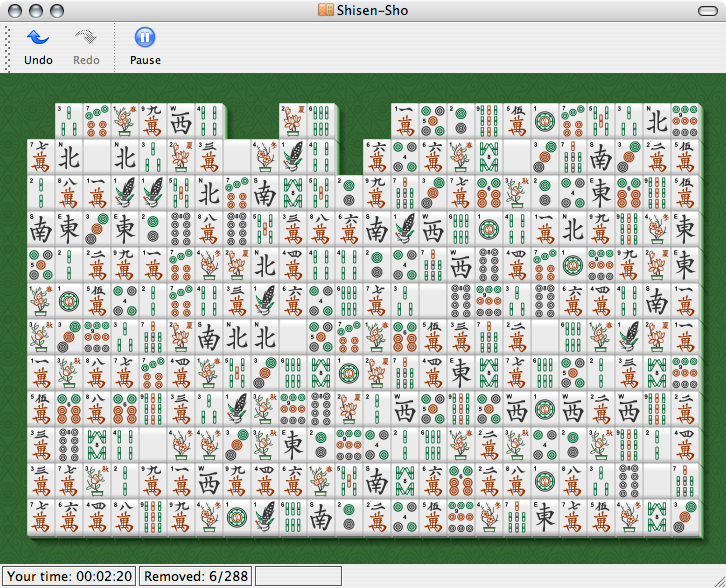
Since we've covered SVG in the first issue, I figured I would show a shot of SVG-goodness in action on the Mac. Below is Shisen Sho, a tile game that shares loadable SVG tilesets with KMahjongg, which was previously featured. This game looks beautiful on the Mac, and not at all out of place.
One of the main questions asked last week about KOffice was support for other platforms. I'm pleased to say that KWord, KSpread, and the rest of the KOffice suite should run on KDE/Mac just fine. In the development version I tested, KWord performed pretty much as the KDE/X11 version from last week. Additionally, I tried loading a few other KOffice applications to see if they work. Here's a shot of KSpread's Wizard, and the KDE 4 file dialog on the Mac.
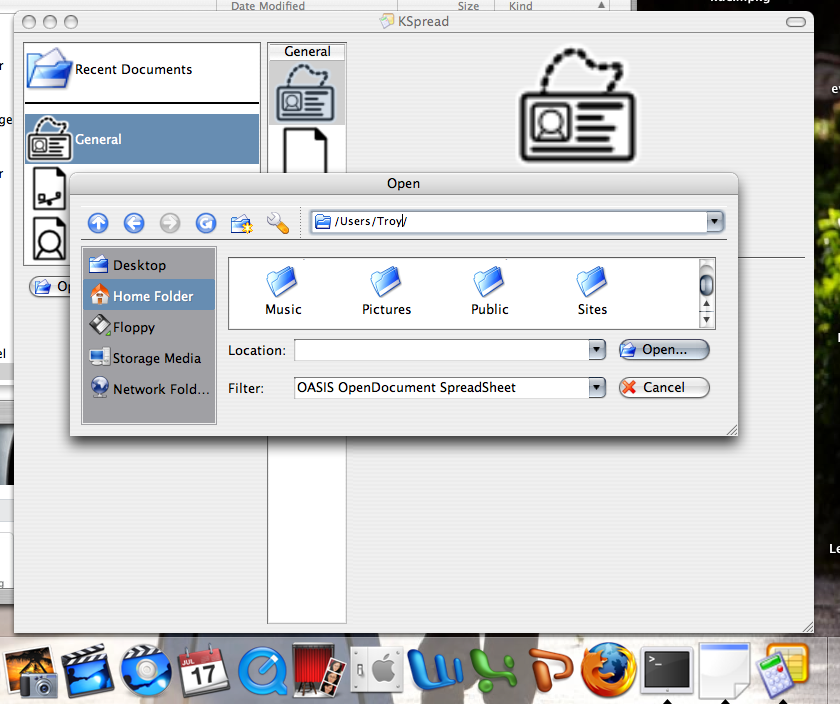
Also notice how the KSpread icon shows up in the OS X dock. This didn't previously happen with KDE on Fink (The icon to the left of it is for kded, one of the KDE background processes, which will eventually be adjusted to hide itself when running on the Mac).
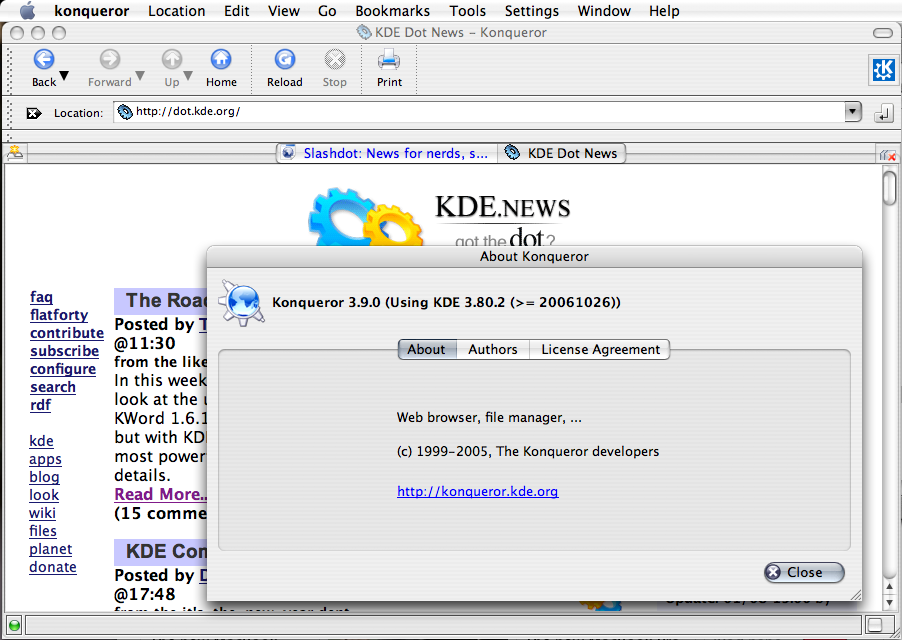
Of course, the real question everyone is asking is: does Konqueror work? Yes. The KDE 4 version of the Konqueror application is mostly a port of Konqueror from KDE 3.5 at the moment, but the backend libraries such as the KHTML rendering engine and Javascript support have seen a lot of fixes and improvements. On the Mac, due to the OS X user interface styling in Qt 4, we get centred tabs during tabbed browsing, as seen below:
The Mac has made a name for itself as a premier Desktop for graphical and multimedia applications. Unfortunately, the KDE Graphics package was not included in this snapshot so I can't show it off.
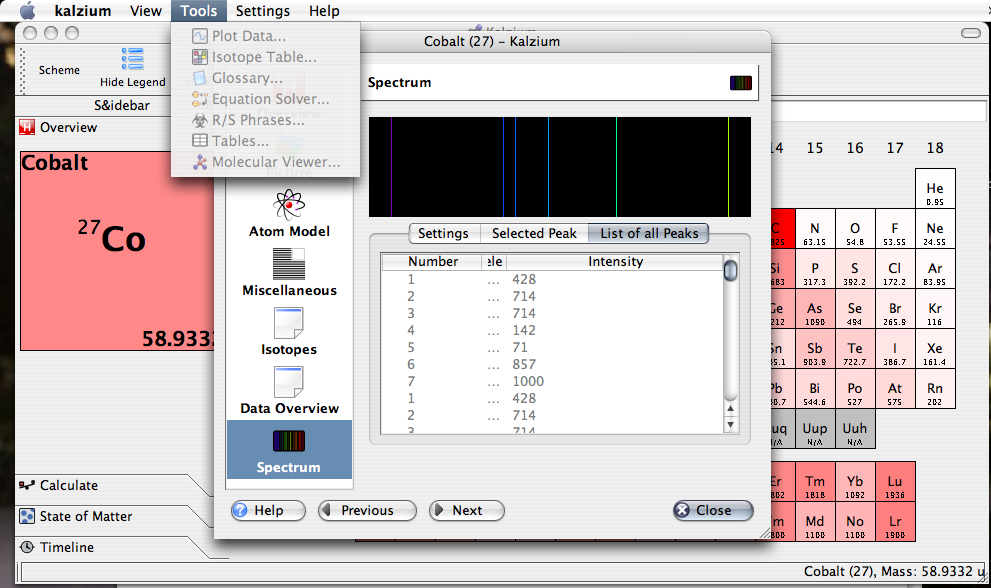
However, another niche that the Mac proudly occupies is that of education. Below are two of the great applications from the KDE-Edu project: Kalzium and KStars. New features that are showing up in KDE-Edu will be featured in a later article... for now, it's just important to note that these superb applications will be available and fully functional for KDE/Mac.

And now that the tour is done, a couple of other things that come up whenever KDE is discussed on other platforms.
While I was researching this article, I encountered some people that object to running KDE apps on a non-free platform, with sentiments on IRC alike to "Anytime you run OSS on a non-free platform, God kills a puppy. A cute puppy."
But KDE has good reasons for supporting other platforms: attracting developers, and fostering interoperability and standards. There are a huge number of Mac and Windows developers out there and therefore a large amount applications that can take advantage of KDE technologies. The best example of a KDE technology benefitting from exposure to other platforms is KHTML/WebKit. As a side effect, since there are so many users of KHTML-based browsers now, websites have had to improve their standards compliance in order to be more compatible, which means more websites work in Konqueror. This will hopefully also happen with OpenDocument and free software groupware systems as KOffice and Kontact push onto other platforms.
In the meantime, have a look at yesterday's KDE Commit-Digest for some information on the progress of Windows platform support.
Comments
but beside the apple look the kde look does look not good :(
the icons in the apps shown are not the oxygen icons, are they?
Oxygen icons are entering kdelibs in SVN today, unless something changed... so future shots should show the new icons...
Digg it!
http://digg.com/apple/The_Road_to_KDE_4_Full_Mac_OS_X_Support
dugg.
Yay, it's on digg frontpage now :)
Great summary, a very interesting read! Good to see things are progressing so nicely.
As for KDE Workspace -- well, while getting just the KDE Applications over to those systems is already a really kool thing, I'd personally welcome an explorer.exe shell replacement. Very much even :)
you're right though the explorer thing just is not up to _anything_ with konqueror. it has more serious security issues however so it's leading somewhere.
anyways i myself will try and look how to get this kde windows stuff to work under wine properly. that'll be phun. foss rulez so waaaay more.
explorer.exe as in the Windows shell, not as in iexplore.exe the browser. Even if KDE Workspace isn't ported, Konqueror will be just as available (at least very likely, anyway), as it is on KDE/OSX.
I like my Windows for its hardware and multimedia support and gaming (not that that happens too often!) and for some applications that I prefer over there, but I love my KDE desktop (and several KDE apps too (hi, eric3 and amarok!)) -- much enough in fact that I'm usually on linux and rather put up with the hell that's sound support in this OS.
Don't forget Reactos
It's a very sweet project and I really hope they succeed in creating an open source Windows clone; and I'm more than willing to give it a spin!
But how does that help me (and others who are in the same boat), with having a KDE desktop and running Windows software I adore (irfanview and xmplay, in particular (okay, the first one runs with Wine), but there are a bunch of others I occasionally need as well), and not having to deal with Linux's inferior hardware and multimedia support? -- because I doubt ReactOS will have kdesktop and kicker :P
http://sourceforge.net/forum/forum.php?forum_id=507276
I agree that an explorer replacement would be a great idea. It would be a wonderful step for people migrating to OSS, as they could have a full K Desktop Environment, but be able to easily start their remaining native Windows apps as needed, and everything would appear consistent.
However, while KDE will have a much superior taskbar, menu and file manager to Windows there would be a problem with providing all the random dialogs and stuff that Explorer is supposed to provide. The ReactOS Explorer (which can be installed on Windows XP; much better for slow machines) seems to load the libraries that the original explorer would load (I have no idea how it works internally, but it certainly produces some windows which look just like the equivalents from the normal explorer). That would be a whole lot of extra work above just making things work on Windows.
Also, will Vista allow the shell to be changed? It's coming out very soon and everyone is going to "upgrade", regardless of the problems/benefits.
Troy, you are doing an awesome job with this "Road" series! I really love them, and they show what is indeed happening in the KDE development. It gets more people interested in KDE, and it finally shows the first real impressions of KDE 4 - some KDE users need this while they are waiting for KDE 4 ;)
I'm really looking forward for your next article.
++
Yay, Winnipeg!
I would content the more application (like firefox and OpenOffice) you can get people to use, the less reason they have to hold onto a closed source system.
If you want to build a wall and not let any closed source users in, you could certainly do that to your own detriment. I would contend this wouldn't be useful in the long term.
You should let you work stand on its merits not on it association.
I agree with your post, I would also like to add 2 points:
1) KDE already ran on closed source systems: UNIX. It has ran in solaris way before it was open sourced, and it runs on other UNIX variants. If indeed they wanted to prevent KDE from running in closed sourced systems, these "ports" should be killed as well.
2) Why is it KDE's goal to promote free software? KDE goal should be to promote KDE, which happens to be free software. Porting it to as many platforms as possible is a great way to make kde more popular.
You would be wrong. While the idea of porting open source applications to closed source environments DOES sound like it would attract people to OS platforms... there is overwhelming statistical evidence to show otherwise.
For example, the easiest way to get OS applications on a non-OS platform is by running OSX. By your theory, Apple users would be some of the quickest converts to open source operating systems. But the reality is that people are LEAVING open source to use OSX; in fairly sizable numbers in fact. When polled, the most significant factor in moving from Linux to OSX was "availability of both Mac and Linux applications on OSX."
In this case cross-platform applications actually facilitated people moving AWAY from open source.
Another example is Firefox and OpenOffice.org themselves. Their availability on Windows has caused NO (as in none, zip, nada) statistically significant movement to open source operating systems. While there are plenty of people switching to Linux from Windows... the fact that they had Firefox and OpenOffice.org available to them on Windows doesn't seem to be a factor in their decision.
do you have a source for those statistics?
"In this case cross-platform applications actually facilitated people moving AWAY from open source."
Are you saying cross platform open source applications facilitate people moving away from open source? Would you care to explain what exactly you mean here?
If you think that a few applications being available on other platforms caused people to move away from Linux, I think you either delusional or intentionally avoiding the real cause of that migration.
Having those applications readily available might make a transition easier but they would not be the impetus for such a move. I would guess that these people either had a compelling reason to migrate to another OS or they found Linux frustrating to use.
I am not so sure about this. My first experiences with linux were caused by my desire to get PostgreSQL running (and I haven't been able to use PostgreSQL on windows back then). Only after being somewhat forced to use it, I stayed on board and kept using it more and more - until linux finally has become my preferred OS.
I guess this is kind of typical for a lot of developers. They start using linux (or the BSDs or OpenSolaris) as their local server (for files, webapps, databases) and _might_ just stick with it because it simply works and it is finally a system where you know what actually is happening.
This is of course different for non-developers (sometimes referred to as users - as if we wouldn't use the systems ourselves). If there is a huge pool of free apps available that are actually used, they of course could switch faster. But I guess this is only relevant (as of now) at work where IT departments in conjunction with the execs of the company recommend which OS (and other software) to use. Whether they suggest (or even evaluate) a free OS or a proprietary one is among other things influenced by the availability of the used apps.
After reading this and the new KDE definitions, I'm a little confused as to the benefit of KDE on other platforms. From what I can understand of the definitions, KDE Workspace is the real meat of what I understand KDE to be. Without the KDE Workspace running on MacOS or Windows, what we are really talking about is KDE Applications running on the other platforms, correct? If so, I don't have an issue with it. But I fail to see how it will help convert users over to Linux. KDE Workspace is how they would see the benefit of KDE itself, but they won't see that part. So really all they get are the cool KDE apps native on their platform but no incentive to switch.
Am I missing something? Someone more knowledgeable, please enlighten me.
Why should the goal of the KDE project be to convert people to linux? What does the kernel have to do with a window manager/GUI toolkit? Are you opposed to KDE running on FreeBSD?
I'm not opposed at all to KDE running on FreeBSD. It is an open system and as I understand it, the full KDE system runs on it. You ask why should the goal of the KDE project be to convert people to linux? That's not my goal per se, but I thought it was stated by some KDE developers that part of the reason for running KDE on Windows and MacOS was to make it easier for windows developers to develop for Linux, thus pulling in more Windows users. If that is a goal, then I was trying to get clarification (or more like education) on how this strategy would do that.
I agree Troy's explanation wasn't very clear.
Putting aside "the convert people to Linux" part, there is one very simple benefit, and it is not "making it easier for windows developers to develop for Linux". It is Windows and Mac developers coding for KDE applications, and in time even kdelibs! They don't need to switch to Linux in order to be beneficial for KDE.
That means, for example, a physicist liking KStars so much, that he decides contributing that missing feature preventing him from dropping his commercial planetarium solution. Same with other apps. The source code improvements come from three operating systems now, Windows, Mac and Linux (and Unixes, of course). Everybody wins.
Ok, now that I understand. So the benefit is that KDE apps get a lot more potential developers who can improve the app. A "side" benefit is that some may convert to Linux/KDE, but that isn't necessarily the main objective.
also some users who need or like to run mac/windows may like to use good software on that platform too. For example me likes to use KMail and amarok while I am on windows (which I need to use for my win=>linux porting jobs :)
Many people find themselves tied, not to a particular platform but to a set of applications. If the applications they use everyday can be found on a different platform, wouldn't that make the switch easier for them? It did for me, when I started using FLOSS apss instead of proprietary ones on Windows. Not only makes it easier to keep using your computer as you did before switching, but also dispels any doubt you might have about the quality of open source software.
I had to use GNOME apps like GAIM or GIMP on windows. Just imagine people using Kopete or Krita... Using a Linux/KDE desktop would make much more sense to them after using kde apps. The learning curve would be way less steep, as they would only have to get used to the desktop per se, and kde can behave very much like windows if configured to. The key is making it easy for people making the switch one step at a time.
On the other hand, KDE apps (and also Gnome/GTK+ apps) looks alien in Windows and Mac environment. And while regular Windows users can accept such things, I guess Mac zea^H^H^H users won't, screaming that they want true Mac OS apps and not foreign shoehorned apps, just like Linux users complain when company X releases a Wine-based Linux version of their products.
I guess a proper iconset could help, yet other issues (HIG) are harder to conciliate.
So, open-minded people who uses multiple platforms at once (specially Unix/Linux people using Mac because its Unix fundation) can get interest on KDE/Mac, but getting hardcore Mac users interested in using KDE apps into the OSX desktop is not a task I believe possible.
As a Mac developer, a Linux developer, and a Windows developer, I think the "OS-centric" viewpoint is dated. No one cares about the OS, they care about the applications.
THAT is what is important.
As a developer I see this as significant because a) wxWidgets reallys sucks and b) QT is pretty nifty (yes, I've used them both).
As for reconciling the HIG with KDE - let me clue you in that there are a LOT of OS X apps out there that do NOT follow HIG.
As for OS X developers, frankly, I would rather write in a real OO language than C++. Sorry, but them's the reality. So, no, you probably won't see folks switch. What you WILL see is more people write cross-platform apps.
THAT is what is important here.
What about this:
KDE is good because it has many apps that are well-integrated together and to the underlying operating system (kio, dbus, ..).
By making it more abstract and by porting the apps on other desktops the efforts are put on dis-integrating the whole desktop.
The identity of the project is now split between those who only care about their apps, and those who want a functional desktop.
Porting to other platforms is an interesting thing if done afterwards, not first.
It is not because something can be done that it must be done.
Porting Kwin/Kdesktop&Kicker(now: plasma)/etc. over would mean writing replacements to the explorer shell and equivalent on the mac. Though if you really want to work in a KDE workspace, just grab a PC-BSD or Kubuntu disk and go nuts. And the argument that you can't install a different OS at work is probably void anyway, considering that you'd be wanting to replace the explorer shell. If you admin lets you do that, (s)he'd probably just let you use unix anyway :)
All of the important bits of KDE cross-application integration will still be there. You can still save to the fish:/ ioslave in the KDE file dialogs, and such, or write scipts to control applications via dbus. Things like KOffice scripting using Kross should be platform agnostic. Other than a few utilities, KWin/Plasma are the only two substantial applications that won't make the journey. KWin is totally redundant on non-X11 platforms, and Plasma is mostly redundant. The only reason one would want to use it is for the little plasma applets (plasmoids), but again, if they're that important to you, use Unix/X11.
Speaking of what you call a real OO language, is it possible to write KDE apps with ObjC?
There used to be Objective C bindings but nobody used them and they were dropped from active maintenance.
I want to second Fede's point. Most people care much more about their applications than their operating system. If people get accustomed to using KDE applications that run on Windows, Mac, and Linux, then they will care a lot less what operating system they're using. And at that point, the advantages of Linux (and other free systems like BSD) will become more compelling and people will start switching when they get tired of paying for Microsoft's cosmetic upgrades and bad security.
Over the short term, I think this will pull more people to Macs from both Windows and Linux. But over the long term we may see more of a shift to open source systems from both Windows and Mac. That's especially true if Mac and Windows developers do contribute to KDE and further improve the applications.
Actually, I think that there are several KDE applications offering great functionality on KDE, why should they be confined to the KDE Workspace only? I have a hard time finding a Latex editor on par with Kile and an email application with the features of KMail on the Mac. I am pretty sure that the developers of those apps will be very happy when they receive their first bug report from a Mac user :-)
KDE/Mac guys, keep up the good work!
Just a question, have you tried TexShop? It works very well for me. http://www.uoregon.edu/~koch/texshop/.
Simple - exposing developers and users to free (as in freedom) software, will benefit the free software community of users if they are accepted and promoted by these new users.
Every license out there puts limits on the freedom of others. Please stop misusing the word freedom. Open Source software licenses are merely more permissive in that they provide access to the source and the permission to redistribute derived works under the same license to other people. The GPL is one of the more restrictive licenses in that it restricts the freedom of developers to make use of the code in only GPL licensed projects. It is viral in nature and because of that, it actually can strip the rights of other developers if they do not educate themselves of all the terms and conditions before they touch the code.
Yeah, and that's intended and works toward keeping the end user's freedom, as opposed to the programmer's freedom which is maximized by using a BSD style license.
Can we please omit this discussion? I can't hear it anymore. Just accept that there isn't only one definition of freedom, and never assume that you know what's right and the other one is wrong. It's just a point of view.
Thanks for stopping this part of the thread.
Troy, you.... ROCK!
Your articles are simply wonderful! Is tomorrow Monday again? Uh?!?! Well... I'm definitely looking forward your next article!
Your feature lists make me desire KDE 4 NOW!!! Damn, it's going to be sooo coool and soooo great, absolutely the greatest DE in the world. I think the portability to Mac and Win is a killer-feature: we will have great free applications working anywhere, well, this is a dream becoming true.
Keep working on, The Road to KDE 4 is amazing!
Seriously. The only thing wrong with The Road to KDE4 is that it is posted so soon after This Week in SVN, so that I have to wait a whole week for my KDE news fix :) Any chance of moving it to, say, Thursdays?
i can only agree.... :D
Love the Road to KDE4 articles. Great work Troy!
Hi Troy,
Thank you for the great article! I'm perfectly fine with people using other operating systems and hardware, as long as they use KDE as their desktop environment/GUI ;-)
So the smart guys started wasting time porting their selfish little apps to more platforms instead of finishing KDE4. Does Qt4 suck or what ? :-)
This said, i am glad to see better integrated apps on the Mac, the ok/cancel buttons are finally on the right side.
PS: no puppies but kittens
KDE is based on Qt. Also on Mac. How do you distill any qt-suckage out of this article?
"So the smart guys started wasting time porting their selfish little apps to more platforms instead of finishing KDE4. Does Qt4 suck or what ? :-)"
Hey, developing for KDE4 base system is a totaly different work than building packages. Would you have complain if the article were about packaging KDE4 to Ubuntu ? Canonical doesn't develop KDE4 (they might help), but you can install somme of the 4th serie on your ubuntu OS.
Thanks to Qt, It's Nearly the same to make an Ubuntu .deb that a OSX .cmg or a windows .exe. (exept low level system specific library and file system and ???)
Just look these as two _huge_ new distrib suported by KDE.
>Just look these as two _huge_ new distrib suported by KDE.
Except these two huge new "distrubitions" (win/osx) are 100% closed source, 100% propietary and patented to hell and back. x.x
ljones
OS X is not 100% closed source. OK it's mostly closed, but hell, the kernel is open.
Windows OTOH doesn't deserve KDE.